Agentforce Vibes 2.0: Inside Salesforce’s New Agentic IDE
Salesforce has spent the last year quietly rebuilding what it means to write code on its platform.
At TrailblazerDX 2026, that effort reached a milestone: Agentforce Vibes 2.0, a browser-based, AI-native development environment that launches straight from your org’s Setup menu, with Anthropic’s Claude Sonnet 4.5 wired in as the default coding model and a usage allowance that costs nothing in Developer Edition.
This isn’t a bolt-on autocomplete. It’s Salesforce’s bet that agentic development becomes the default where you describe intent in natural language and an org-aware agent plans, writes, and tests the code against your real metadata. Here’s what it does, how to try it today, and the caveats worth keeping in view.
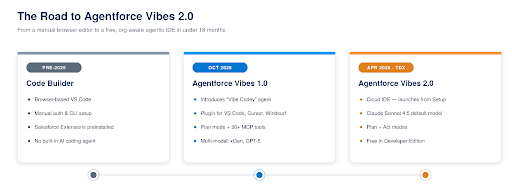
Figure 1 – The evolution from Code Builder to Agentforce Vibes 2.0.
How We Got Here: Code Builder → Vibes 1.0 → Vibes 2.0
To understand why Vibes 2.0 matters, it helps to trace the lineage. Salesforce’s browser-based IDE began life as Code Builder, a cloud-hosted Visual Studio Code environment that spared developers from local setup but still required manual authentication and offered no built-in AI agent.
In October 2025, Salesforce launched Agentforce Vibes 1.0, introducing “Vibe Codey”, an agentic coding partner that understood Salesforce schema, supported Plan mode, shipped with 20+ Model Context Protocol (MCP) tools, and worked as a plugin across VS Code, Cursor, and Windsurf. Crucially, it already supported multiple models, including Salesforce’s xGen and GPT-5.
Vibes 2.0, unveiled at TDX 2026, folds all of this into the org itself. The IDE is no longer just a plugin you install, it’s the successor to Code Builder, launchable from Setup, authenticated automatically, and free in every Developer Edition org. The headline change: Claude Sonnet 4.5 is now the default model, and a new Act mode complements Plan mode to close the loop from idea to working code.
What’s New in Agentforce Vibes 2.0
Vibes 2.0 is best understood as three capabilities working in concert: an org-aware IDE, a multi-model coding agent, and MCP connectivity that links external AI tools to your org’s data. The diagram below shows how the layers stack.
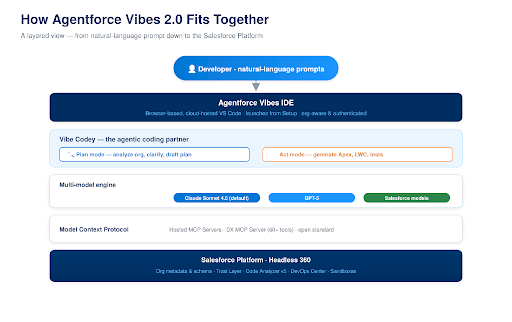
Figure 2 – The Agentforce Vibes 2.0 stack, from prompt to platform.
1. A browser IDE that already knows your org
Open Setup, click Agentforce Vibes, and within moments you’re in a full VS Code editor with Salesforce Extensions, the Salesforce CLI, and GitHub integration preconfigured. Your org’s metadata loads automatically into an SFDX project – no manual authentication, no CLI setup, no extension hunting. You can develop and deploy Apex, Lightning Web Components, and flows; run tests; and use the integrated terminal, all from the browser.
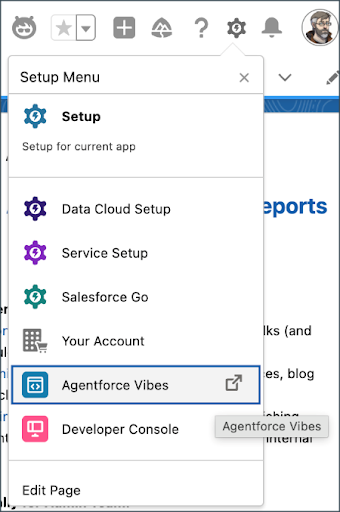
Launching Vibes: Setup menu dropdown with Agentforce Vibes highlighted
Source: Salesforce Admins Blog – “Introduction to Agentforce Vibes for Salesforce Admins”.
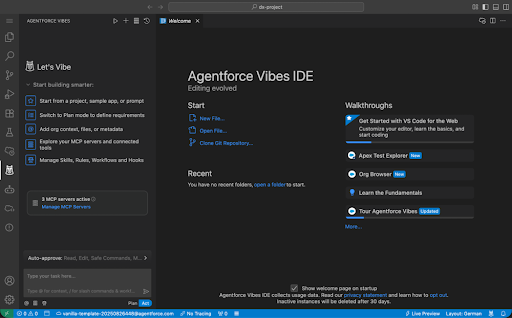
Agentforce Vibes IDE open in the browser (VS Code editor + sidebar)
Source: Salesforce Developers Blog – “New in Salesforce Developer Edition: Agentforce Vibes IDE, Claude 4.5, MCP”.
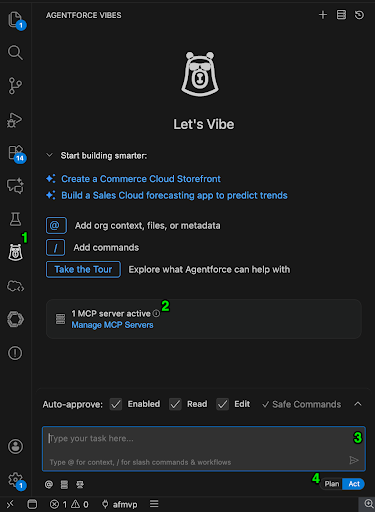
A quick tour: the Codey Vibes icon, MCP config, conversation panel & Plan/Act toggle
Source: Salesforce Admins Blog – “Introduction to Agentforce Vibes for Salesforce Admins”.
2. Plan mode and Act mode
The coding agent operates in two complementary modes. Plan mode analyses your org, clarifies requirements, and generates an implementation plan before writing a line. Act mode then creates and modifies Apex classes, LWCs, triggers, and test classes from your natural-language instructions. Tell it “Create a trigger that prevents duplicate Accounts based on email” and it reads your actual org structure first, so no hallucinated field names.
Importantly, the agent does not deploy anything unless you explicitly ask. By default, it modifies local project files that you review first, a guardrail that keeps a human in the loop before changes reach the org.
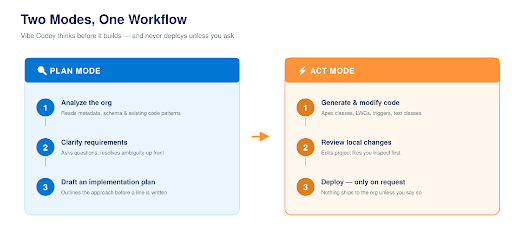
Figure 3 – Plan mode reasons about your org before Act mode writes any code.
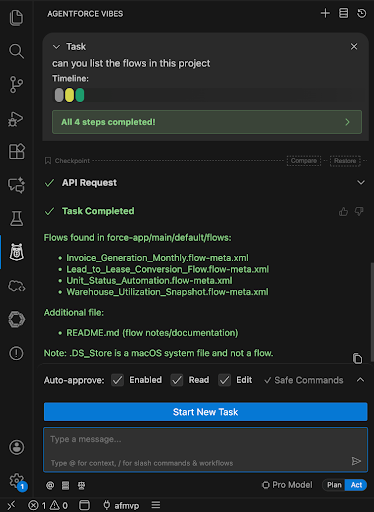
Act mode in action: Vibes explains each step as it lists the flows in a project
Source: Salesforce Admins Blog – “Introduction to Agentforce Vibes for Salesforce Admins”.
3. Multiple models, including Claude Sonnet 4.5
Vibes is model-flexible. In Developer Edition, Claude Sonnet 4.5 is the default coding model, with GPT-5 and Salesforce’s own models also supported. Because the agent is extensible through MCP, teams can route different tasks to different models over time without changing their workflow.
4. MCP connectivity : Hosted and DX servers
Model Context Protocol, the open standard created by Anthropic, acts as a universal interface between AI assistants and external data. Vibes 2.0 ships alongside two MCP options: Hosted MCP Servers (running on Salesforce infrastructure, OAuth-authenticated per user, exposing sObject API access, invocable actions, and flows) and the DX MCP Server (running locally with 60+ developer tools for metadata, Apex testing, and LWC work). Both respect your org’s security model, object and field-level security, sharing rules, and profiles all apply.
The two servers serve different needs:
| Dimension | DX MCP Server | Hosted MCP Server |
|---|---|---|
| Runs on | Your local machine | Salesforce infrastructure |
| Authentication | CLI credentials | OAuth 2.0 (per user) |
| Primary tools | 60+ dev tools (metadata, Apex, LWC) | sObject API, invocable actions, flows |
| Best for | Development & deployment workflows | Data access for external AI tools |
| Requires local CLI | Yes | No |
Source: Salesforce Developers Blog; Salesforce Help – Hosted MCP Servers documentation.
How to Get Started in Minutes
If you have a Developer Edition org, the features are rolling out now. Just search Setup for “Agentforce Vibes.” If you don’t, signing up is free and the org doesn’t expire as long as you log in regularly. Here’s the fastest path to your first agent-built component:
- Launch the IDE. Open Setup in your sandbox or Developer Edition org and click Agentforce Vibes. You’ll land in an authenticated VS Code session.
- Start from a template. Pick the React App template on the welcome screen, choose “Internal App,” and describe something small, like a list view of a standard object, or a form for a custom object.
- Reference your own metadata. Ask Vibes to build something that uses your custom objects. It generates code that works with your actual data model, not generic boilerplate.
- Use Plan mode first. Draft the approach before switching to Act mode as it produces better results and conserves your request allowance.
- Connect an MCP server. Configure a Hosted MCP Server so a client like Claude Desktop can query the data your component displays, then iterate.
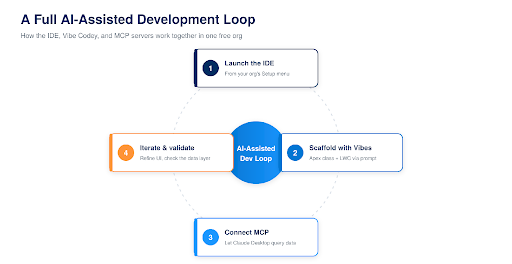
Figure 4 – The IDE, Vibe Codey, and MCP form one continuous development loop.
| Trailhead quick start
Salesforce has published a guided “Troubleshoot Code with Dev Agent” Quick Start project, plus a deeper Agentforce Vibes Workshop on the developer portal that covers the multi-model features hands-on. |
Here’s a concrete example of the payoff. Ask Vibes to analyze an existing flow for best practices and it returns a structured, shareable review – the kind of second opinion that used to require an architect’s time.
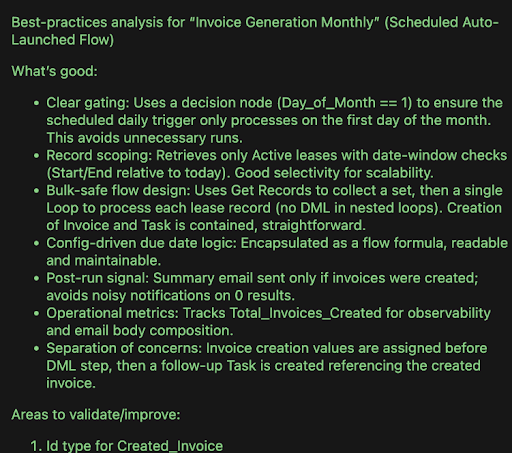
Real output: Vibes reviews an existing flow against best practices
Source: Salesforce Admins Blog – “Introduction to Agentforce Vibes for Salesforce Admins”.
What You Get, and the Limits to Know
The Developer Edition allowance is generous enough to build real things, but it’s not unlimited. Knowing the numbers up front helps you plan your experimentation.
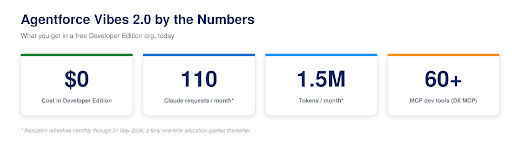
Figure 5 – The free Developer Edition allowance at a glance.
Specifically, Developer Edition includes 110 requests and 1.5 million tokens per month with Claude Sonnet 4.5, refreshing monthly through 31 May 2026. After that date, a one-time allocation of the same size applies with no further refresh. So, the practical advice is to start now, use the monthly cycles to explore broadly, and save the final allocation to finish what you’ve started.
| Tip: stretch your requests
Use Plan mode before Act mode, be specific in prompts (“create an Apex before-insert trigger on Lead that checks for duplicate Email values” beats “build something for leads”), and retrieve only the metadata relevant to the current task. |
Source: Salesforce Developers Blog — usage limits for Developer Edition (Apr 2026).
What to Watch
Agentic development is powerful, but it doesn’t remove the need for engineering judgement. A few honest caveats worth keeping in view:
- Review everything. Vibes edits local files for you to inspect and never deploys without explicit instruction. So, treat that review step as mandatory, not optional. Generated Apex and LWC still need the same scrutiny you’d give a junior developer’s pull request.
- MVP ≠ production. The tool dramatically shortens time-to-working-prototype, but architects and developers still own testing, observability, and governance before anything reaches production.
- Allowance planning. The free tier is for learning and prototyping. Production-scale or team use will need a paid path once Salesforce opens broader purchasing of requests and premium models.
- The role shift is real. As these tools mature, the developer’s value moves toward guiding the agent effectively and evaluating what it produces, which means platform fundamentals (Apex, LWC, the security model) matter more, not less.
The Bottom Line
Agentforce Vibes 2.0 is the developer-facing piece of Salesforce’s broader “Salesforce Headless 360” strategy i.e., making everything on the platform callable by agents as an API, MCP tool, or CLI command. Whether or not you embrace vibe coding wholesale, the direction is clear: org-aware, agent-assisted development is moving from novelty to default. The professionals who thrive will be the ones who learn to guide these tools well, alongside and not instead of deep platform knowledge.
| Your next step
Spin up a free Salesforce Developer Edition org, open Setup, and search for “Agentforce Vibes.” Build one small component end-to-end with Plan and Act modes as it’s the fastest way to form your own opinion on where agentic development fits in your work. |
Sources & Further Reading
- Salesforce Developers Blog – Agentforce Vibes IDE, Claude 4.5, MCP
- Salesforce Developers – Agentforce Vibes IDE documentation
- Salesforce Ben – Salesforce Launches Agentforce Vibes
- Salesforce Developers – Agentforce Vibes Workshop
- Sign up for a free Developer Edition org
For more insights, updates, and expert tips, follow us on LinkedIn.