

How to Automate Customer Onboarding With the Salesforce OCR KYC Verification Solutions
Imagine a new customer fills out your onboarding form, uploads their ID, and is fully verified without a single agent manually reviewing a document. That’s not a future vision. Businesses using Salesforce OCR KYC solutions are doing exactly that, today, cutting onboarding time from days to minutes.
Speeding up customer identification processes not only helps stay compliant but can be seen as a business advantage too. Slow KYC procedures cost companies many potential clients who leave during their identification process. At the same time, with cases of fraud growing in the banking, fintech, telecom, and insurance industries, companies which still perform verification manually are taking risks.
This article will give you an insight into the process of integrating KYC OCR in Salesforce and all the advantages it brings to your company.
What Is Salesforce OCR KYC And Why Does It Matter?
KYC (Know Your Customer) is the procedure of identifying the client’s identity prior to and during the process of onboarding the customer. It is a statutory requirement in the financial services sector, NBFCs, insurance, telecoms, and many other industries. Conventionally, KYC has been achieved through the submission of physical documentation and manual input.
But OCR (Optical Character Recognition) makes all the difference. The OCR software can read any text on identity cards like Aadhaar, PAN cards, GST certificates, passports, or driving licenses, extracting information seamlessly. With the integration of OCR in Salesforce, the entire process takes place within the CRM itself.
What Salesforce-native KYC solutions like IdentryX by Manras bring to the table is a fully integrated identity verification engine. Agents can initiate verification, track status, review results, and store compliance records all within the same platform they use for sales, service, and customer management. No platform switching. No data export risk. No manual re-entry.
It is precisely this that makes OCR for Salesforce ID verification so effective: It transforms a multi-step process spanning days into a single task that happens in an instant.
Advantages of Automated Customer Onboarding Using KYC OCR
While automation does make processes quicker, there are many other ways in which automated KYC verification within Salesforce creates value.
- Extremely Fast Onboarding KYC – It usually takes 3-7 business days via manual onboarding. Automated salesforce OCR based KYC workflow does it all within 10 minutes. Think about how many more customers you’ll acquire this way versus the others you would’ve lost.
- Automated eKYC processes – Processes have already shown up to 70% savings due to reduced costs in terms of eliminating manual data entry, less labor hours, and zero document handling.
- Increased Accuracy With Better Auditability – Human operators are prone to errors, especially when processing high volumes. OCR-based ID verification together with document forensics powered by artificial intelligence can detect pixel manipulation, mismatches in font types, absence of a hologram which shows tampered IDs. In other words, it eliminates fraud approvals.
- Compliance with No Extra Work – For compliance purposes (as per AML/KYC regulations), automated systems are able to maintain verification records connected directly to customer records on Salesforce thus leaving no room for disputes during any audit.
- Enhanced User Experience – Customers want an experience that goes beyond submitting paperwork or waiting a couple of days to verify. Automating your KYC compliance on Salesforce will help to provide users exactly what they want, seamless onboarding right from their phones in minutes.
How OCR, ID Verification, and Face Matching Work Inside Salesforce?
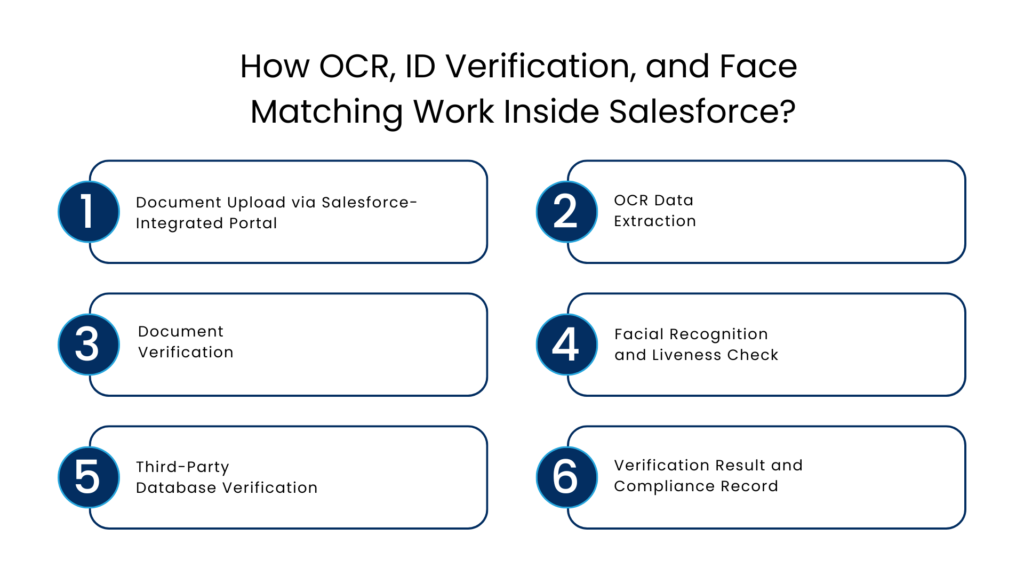
Understanding the technical flow helps implementation teams design processes that actually stick.
Step 1: Document Upload via Salesforce-Integrated Portal
When a new lead or customer enters Salesforce, the KYC workflow is automatically triggered. The customer receives a secure link to upload their identity documents Aadhaar, PAN card, GST certificate, or any supported government-issued ID through a CRM-embedded form or portal.
Step 2: OCR Data Extraction
It is the step where ID verification OCR Salesforce solution completes its major tasks. The OCR software tool automatically extracts data from the identification document fields like full name, birth date, identification number, address, and others. All processes are automatic, and no operator participation is needed.
Step 3: Document Verification
AI-based image forensics checks the document for any sign of forgery or tampering. The tool detects irregularities in font, placement of holograms, document edges, and pixels. At this stage, fake or altered documents are filtered out before being reviewed by a human analyst.
Step 4: Facial Recognition and Liveness Check
Face recognition KYC Salesforce is the most vital layer in the process of identity authentication. The solution matches a person’s face from the selfie or video to the photo in their official ID through biometric facial recognition technology. Liveness detection helps verify the presence of an actual person by ensuring that the document is not submitted via printouts or prerecorded videos.
Step 5: Third-Party Database Verification
For Indian businesses, solutions like IdentryX go a step further cross-referencing identity data against official government databases. OTP-based Aadhaar verification, PAN validation matching legal name and date of birth, and GST number verification against registered business records all happen within Salesforce, without any third-party redirection.
Step 6: Verification Result and Compliance Record
Once verification is complete, the result approved, flagged, or rejected is written directly to the Salesforce customer record. A complete audit trail is maintained, timestamped and stored, ready for compliance review at any time.
Challenges Faced When Not Implementing Automated KYC Integration
Being blunt, here is how things may look without automated integration of KYC compliance Salesforce. Typically, businesses lacking the latter tend to experience:
- Increased onboarding time frames that make their clients upset and increase the number of dropped customers, making prospects fail to become clients during their first attempt
- Increased operational expenses associated with manual verification, document delivery, and the physical storing of identity documents
- Inconsistency in the process of compliance because the manual verification may be performed with errors or in different ways by several agents or from other offices
- Fraud possibility while the client is being on-boarded because of not being able to recognize forged or fake identity documents
- Data silo creation because the identity is verified in one place, whereas the client management takes place in another
- Inability to scale up, since what works for 50 clients per day will simply stop working for 500
- Failure to comply with regulations will be costly, especially in regulated industries.
Best Practices for KYC OCR Integration in Salesforce
If you’re planning to implement or optimize a KYC OCR integration within your Salesforce environment, these practices make the difference between a deployment that works and one that transforms your operations.
Start With a Process Audit – Map your current onboarding workflow before configuring any automation. Identify every manual touchpoint, document handoff, and verification step. The goal is to eliminate human intervention where the technology can handle it more accurately and quickly.
Choose a Salesforce-Native Solution – Third-party integrations that sync data between systems introduce latency, security risk, and reconciliation overhead. Salesforce-native solutions keep all data, workflows, and audit your verification process needs to be designed to accommodate different types of IDs depending on their location and type of customers you want to serve: Aadhar card, PAN Card, passport, voter ID card, or driving license.
Risk-based Verification – Not all customers need to go through extensive verification processes. Differentiate according to value or risk and assign appropriate verification processes: light verification for small value transactions, comprehensive verification for large value transactions.
Configure Multi-Document Support – Real-world customers don’t always have the same documents. Build your verification flow to accept multiple valid ID types based on geography and customer segment Aadhaar, PAN, passports, voter IDs, and driving licenses as appropriate.
Implement Tiered Verification – Not every customer requires the same depth of verification. Configure risk-based tiers lighter verification for low-value transactions, full biometric and database verification for high-value or high-risk onboarding.
Maintain a Complete Audit Trail – Every verification action document upload, OCR extraction, face match result, manual review override should be logged and timestamped in Salesforce. This is non-negotiable for regulatory compliance and is often the first thing auditors request.
Train Your Team on Exception Handling – Automation handles the majority of cases. But edge cases, unusual documents, low-quality images, liveness detection failures need clear human escalation paths. Ensure your agents understand how to handle flagged verifications without creating bottlenecks.
Conclusion
Customer onboarding is your first impression. It’s also your first compliance test. Getting it wrong costs you in both dimensions lost customers and regulatory exposure.
Salesforce OCR KYC services bridge the disconnect between customer expectations (fast, digital, seamless) and compliance needs (validated, logged, trackable). OCR services such as IdentryX from Manras enable this natively through Salesforce without any need for custom integration or a change to the platform.
The businesses winning on customer experience in regulated industries aren’t doing more manual verification. They’re doing smarter, automated verification and they’re doing it inside the CRM they already use.
If your onboarding process still relies on manual document review, the question isn’t whether to automate. It’s how quickly you can get there.
FAQs
What do we mean by OCR KYC?
Salesforce OCR KYC denotes the use of OCR technology, built-in in Salesforce CRM, for extracting identity information from the uploaded document such as Aadhaar, PAN, passport, etc. The solution extracts the document information, validates the extracted data with official databases, and then records the validation status of the information on the customer’s Salesforce record without requiring an agent’s participation.
Explain face matching in the context of KYC verification of salesforce.
In Salesforce, the process of verifying the customer using face-matching KYC involves performing facial recognition against the customer’s live photo/video feed to compare it with the image captured in the government-issued ID submitted by the customer. Face matching and anti-spoofing/liveness detection technologies ensure the presence of the real person.
Which of the following industries will have the most to gain from Automated KYC in Salesforce?
Banks, NBFCs, insurance companies, fintech companies, telecom service providers, mobile wallets, real estate companies, and healthcare providers will stand to benefit. All businesses dealing with a regulated industry where customer identification is involved will have much to gain from automation of KYC.
Can Salesforce OCR KYC solutions validate Aadhaar, PAN, and GST documents?
Yes, automated CRM KYC solutions such as IdentryX provided by Manras can be used to verify Aadhaar using the one-time password (OTP), PAN documents based on the name and date of birth matching, and GST document numbers against official business registered records.
What is the level of cost reduction associated with automation of KYC in Salesforce?
Companies have realized savings of up to 70% with the use of eKYC in their Salesforce systems because of cost efficiency arising from minimized manual entry of data and fewer working hours as well as faster processing and reduced cases of fraud.
How does the integration of the Salesforce KYC OCR system comply with auditability and regulatory requirements?
All activities involved in the automation process of eKYC system such as uploading of documents, information extraction, identification, facial match approval or rejection, among others, are captured and recorded using timestamps to enhance auditability.
For more insights, updates, and expert tips, follow us on LinkedIn.