

Password Vs Multi Factor Authentication in Salesforce: Which is More Secure and Why
Businesses today deal with a heavy amount of customer data on a daily basis and therefore it becomes absolutely critical to protect the sensitive information. While passwords were a brilliant way a few years back, they still rank the risk of hacking. Therefore, to establish strong security measures and not let any fraud pass through the system, multi factor authentication in Salesforce started grabbing attention.
While passwords are still being widely used by 99% businesses in India, Salesforce MFA adds an extra layer of protection and helps in protecting the user records at all costs. The frauds if they happen are instantly detected with the AI mechanisms and are flagged at the first stage itself.
This blog post tends to explore how password authentication works, how multi-factor Salesforce authentication works, and how the two differ from each other. The aim is also to help the users and businesses alike why two-factor authentication in Salesforce has become the gold standard.
Understanding Password Based Authentication
Password based authentication has been a working system to verify Aadhaar, PAN, and GST for years, and is the most common and widely used method. It relies on angle factor authentication, typically – username and password.
How Does Authentication Work?
Doing password-based verification is simple. The concerned person simply adds their username and password, and once the system verifies those details, the access is granted.
However, this has its own set of advantages and disadvantages. Check out these pros and cons below.
| Category | Point | Description |
| Advantages of Password Authentication | Ease of Implementation | Password-based systems can be easily implemented and require minimal technical effort. |
| Familiarity among users | Most users are already using passwords for login which is making adoption easy. | |
| No additional tools or devices required | Users just need to remember their credentials, without relying on any extra hardware or apps. | |
| Limitations of Password Authentication | Weak Passwords | Users often create simple or reused passwords that make them easy to guess or crack. |
| Phishing Attacks | Attackers may and often trick users into revealing credentials through fake emails and websites. | |
| Credential Stuffing | Compromised passwords from one platform can be used to access other systems. | |
| Lack of Two-Step Verification | Systems rely on a single factor, granting access even if credentials are stolen. |
What is Multi-Factor Authentication in Salesforce?
Put simply, multi-factor authentication is an added step to the existing password verification. Firstly this happens directly inside the Salesforce CRM, essentially meaning that the data and verification details are directly linked to the CRM.
This reduces the risk of errors and frauds. Majorly owing to the factor that the authentication is completed within the Salesforce CRM and the users need not go to any other application. Moreover, the system verifies you via the documents like Aadhaar, PAN, or GST, that are readily available and submitted by users in the CRM.
The multi factor authentication in Salesforce typically combines the following –
- Something user knows i.e., Password
- Something users have i.e., mobile phones or any other device
- And something you are i.e., biometric verification (facial or fingerprint scan)
How MFA Works Within the Salesforce CRM?
The typical way in which the Salesforce MFA works is given below:
- The user first provides their login credentials – username and password
- They are asked to provide the second authentication factor
- They then verify their identity through one of the below mentioned options:
- One-Time Passcode (OTP)
- Approval through the authenticator application
- Biometric authentication
Authentication will only take place if both factors are authenticated. Thus, even if the password is stolen by a hacker, the system can block him because of the second factor.
Key Differences Between Passwords and Salesforce Biometric Authentication
| Aspect | Password Authentication | Salesforce Multi-Factor Authentication (MFA) |
| Security Level | Relies on a single layer of security, making it easier to breach | Uses multiple layers, making unauthorized access much harder |
| Risk of Data Breach | Stolen credentials can directly lead to a breach | Additional verification significantly reduces breach risk |
| User Verification | Verifies only what the user knows (password) | Verifies identity using multiple factors for higher accuracy |
| Protection Against Modern Threats | Vulnerable to phishing, credential stuffing, and brute-force attacks | Designed to protect against these modern threats |
| Compliance and Regulations | Often does not meet compliance requirements | Helps meet industry security and compliance standards |
Why is MFA More Secure Than Passwords?
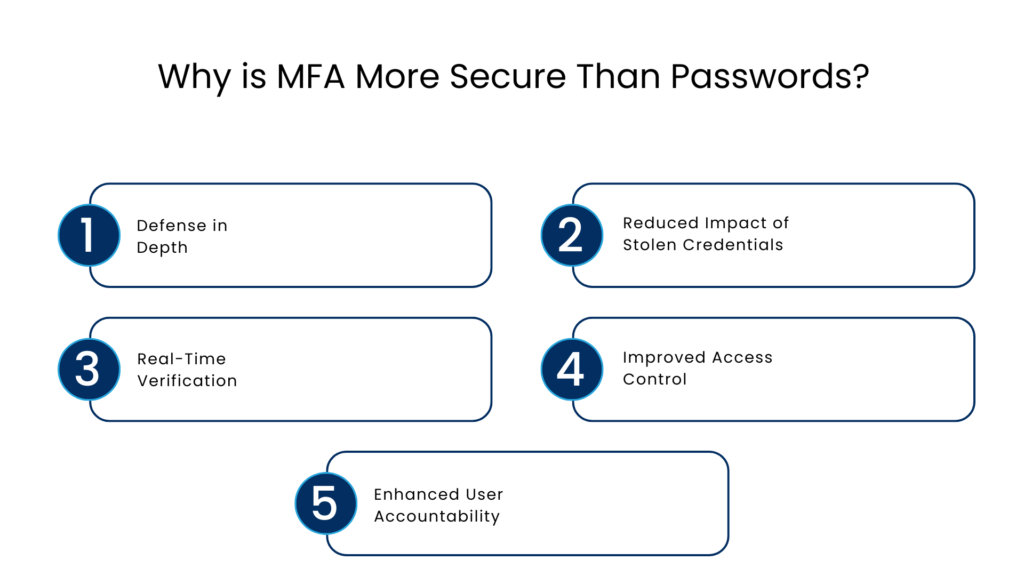
Defense in Depth
MFA involves multiple layers of authentication and security. In this case, even if one layer is compromised, the other remains intact allowing for stronger protection.
Reduced Impact of Stolen Credentials
If a password is stolen, it is still not useful for hackers to get into the system. The reason being that they need access to the second factor authentication which is linked to a personal device.
Real-Time Verification
With multi factor authentication in Salesforce and solutions like IdentryX, the user is required to interact in real-time by providing a selfie. This makes it harder to attack the systems.
Improved Access Control
Administrators can enforce the Salesforce MFA policies across users ensuring consistent security standards throughout the organisation.
Enhanced User Accountability
MFA guarantees that the user trying to access the network is the legitimate owner of the credentials and not someone else pretending to be him or her.
Multi-Factor Authentication Features in Salesforce CRM
The following multi-factor authentication features have been implemented into Salesforce CRM to ensure security:
- Integration with authenticator applications
- Biometric methods support
- Policy flexibility and implementation
- Seamless user experience
Moreover, the company itself requires many users to use MFA in their operations.
Myths Associated with Multi-Factor Authentication
MFA is difficult for users
Modern multifactor authentication solutions are convenient and easy to use and only one tap or the entry of a code is necessary. The extra step does not cause any inconveniences.
It reduces productivity
Even though MFA requires a few seconds longer login time, it saves companies from security incidents and consequent downtimes.
Strong passwords are sufficient
A password is always vulnerable, and hackers can steal it with a phishing attack or data breach.
Best Practices for MFA Implementation in Salesforce
In order to derive maximum advantage from MFA, companies can follow these recommendations:
- Make MFA Mandatory for All Users: Make sure that users cannot bypass MFA in certain situations and use it only for some roles.
- Utilize Trusted MFA Technologies: Use strong methods like authenticators and biometric verification rather than SMS-based codes.
- Train Employees: Make sure your employees know about the necessity of using MFA and how to use it properly.
- Conduct Periodic Audits of Login Activity: Monitor all the actions taken by employees to detect any suspicious activity.
- Implement MFA Together with Other Solutions: MFA can become one of the parts of the security system along with access management and encryption.
Future Trends in Authentication in Salesforce
Due to the increasing variety of cyber threats, new authentication techniques are constantly being developed. In addition to MFA, in the near future we can expect:
- Password less authentication
- Advanced biometrics
- AI-powered identity verification
Conclusion
In terms of comparing password authentication to multi factor authentication in Salesforce, the choice is obvious. MFA provides a much higher degree of security than passwords. Although passwords provide an initial layer of security, they have become insufficient in today’s environment full of cyber threats.
MFA in Salesforce CRM helps to enhance the level of security and minimize the chances of data leaks. Moreover, it guarantees that the user is the legitimate owner of the account and allows access to no one else but him or her.
For organizations that want to protect themselves from any potential security threats, implementing MFA is crucial.
FAQs
Is MFA mandatory in Salesforce?
Your Salesforce users must receive an MFA challenge when they log in to your SSO site and they must verify their identity with a strong verification method. One-time passcodes via email, text messages, and voice calls aren’t acceptable.
How is two-factor authentication Salesforce implemented?
Multi-factor authentication is a process in which a user proves their identity by providing multiple types of evidence, referred to as “factors,” during login. The first factor used for this purpose is information, such as the username and password combination. The second factor includes verifiers possessed by the user.
What are some of the elements that are used in Salesforce MFA?
Salesforce MFA uses something known to the user (password), something owned by the user (a mobile device), and something intrinsic to the user (biometric verification). These multiple layers make the process secure.
How does MFA help in Salesforce CRM?
Upon logging into the account using a password, the user has to undergo another layer of authentication via OTP or authenticator code or biometric authentication.
Why does MFA lower risks of committing any fraud?
The chances of committing any fraud are reduced when MFA is enabled because even if the password gets leaked, the attacker will not be able to bypass it without the second factor.
Why is MFA considered the golden standard?
MFA offers better protection than passwords alone and meets the requirements of present times. It ensures better security of data and prevents any potential fraud attacks.
For more insights, updates, and expert tips, follow us on LinkedIn.