

Why You May Never Log Into Salesforce Again – The Future With Headless 360
Salesforce just declared that everything on the platform is now an API, an MCP tool, or a CLI command. For 25 years, using Salesforce meant working inside Salesforce. That assumption is over. This is the deepest look at what changed, what it means for architects, developers, and admins, and where the platform goes from here.
There is a question Salesforce Co-Founder Parker Harris asked on stage last month that has been quietly rattling around the ecosystem ever since. He did not pose it as a provocation. He posed it as a direction.
| “Why should you ever log into Salesforce again?”
– Parker Harris, Salesforce Co-Founder |
For a company whose entire commercial history is wrapped around the act of logging into a browser, pointing at the Setup menu, and clicking through a console, this is not a small question. It is the central thesis of a multi-year, multi-billion-dollar architectural rebuild that the company unveiled at TrailblazerDX 2026 in San Francisco on April 15 under a single, intentionally provocative brand: Salesforce Headless 360.
The launch dropped seven coordinated announcements in a single morning. AgentExchange consolidated AppExchange, the Slack Marketplace, and the Agentforce ecosystem into one storefront with 13,000-plus listings and a fresh $50M Builders Fund. Agentforce Vibes 2.0 arrived with multi-model support. The DevOps Center has an MCP server. Testing Center, Custom Scoring Evals, A/B Testing, and an open-source Agent Script DSL all shipped together. And quietly underneath all of it, a developer preview of the Salesforce Data 360 MCP Server began landing in real orgs.
Strip away the brand exercise and what Salesforce is actually saying is this: the platform is no longer a destination. It is a programmable substrate that humans and AI agents both reach into from wherever they already work – Slack, Claude Code, ChatGPT, Cursor, WhatsApp, a phone line, or a custom React surface that does not exist yet. The Lightning Experience does not go away. It simply stops being the only way in.
A 25-Year Habit, Quietly Broken
To appreciate what Headless 360 actually represents, it helps to think back to how Salesforce got used for the better part of a quarter century. A customer service rep opened a console. They clicked into a case. They updated a status, typed a note, pushed a button to send an email. A sales rep logged a call, dragged an opportunity through a pipeline stage, attached a quote. A human did the navigating. A human did the clicking.
Every capability the platform offered was, in effect, a UI surface. Even the integrations were UI-shaped underneath – REST and SOAP APIs that mirrored the object model, governance enforced through profiles, permission sets, and sharing rules originally designed for human users. The platform expanded enormously in that window. Apex, Lightning, Experience Cloud, Industry Clouds, Salesforce Data Cloud, Einstein, Genie, Slack. But the mental model never moved. To do something in Salesforce, someone – or something – had to be inside Salesforce.
Two and a half years ago, Salesforce made a different bet. The team began to systematically strip the platform’s capabilities out from behind their UIs and re-expose them as three things: APIs, Model Context Protocol (MCP) tools, and CLI commands. Not as a one-off integration project. As a re-platforming. The result is Headless 360 – a brand that wraps the new posture into a single story: the same Salesforce, every capability, no browser required.
| WHY THE TIMING MATTERS
Across 2024 and 2025, the explosive growth of agentic coding tools – Claude Code, Cursor, Codex, Windsurf – created a generation of developers who increasingly build by conversing with AI models rather than navigating product UIs. These developers do not click through Setup menus. They prompt, they invoke tools, they ship. For Salesforce, which has dominated CRM by being where business users go to work, that is an existential shift in the developer surface. Headless 360 is the company’s answer: if the next generation of builders lives inside their IDE and their AI assistant, the platform has to be reachable from those places natively. |
What Salesforce Headless 360 Actually Is
At its core, Headless 360 is a posture, not a product. It is the declaration that every meaningful capability on the Salesforce platform – querying records, deploying metadata, executing flows, running an approval chain, invoking an Apex method, scoring a lead, resolving a case – can now be reached three different ways: as a documented REST or GraphQL API, as a tool an AI agent can invoke through MCP, or as a Salesforce CLI command a developer or a CI pipeline can call directly.
At the April 15 launch, Salesforce grouped the new capabilities into three pillars. They are worth understanding individually, because each one solves a different problem in the agentic stack.
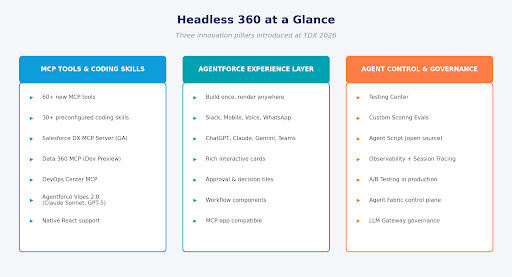
Figure 1 – The three innovation pillars introduced under Headless 360 at TDX 2026.
The first pillar is the MCP-and-coding-skills layer. More than 60 new MCP tools and 30-plus preconfigured coding skills now expose the platform to any AI coding agent that speaks MCP. The second is the Agentforce Experience Layer – a new UI service that lets agents deliver rich, interactive components that render natively across Slack, ChatGPT, Claude, Gemini, Teams, mobile, and any MCP-compatible client. The third is a fresh set of agent governance tools – Testing Center, Custom Scoring Evals, the open-source Agent Script, observability, session tracing, and A/B testing – designed to make agents behave the way you designed them, weeks after launch.
Held together, these three pillars amount to a complete agent development lifecycle, exposed programmatically. A coding agent can discover org metadata, write Apex against it, deploy through DevOps Center via natural language, evaluate the result against custom scoring criteria, and run a controlled A/B test in production – all without a developer opening the Setup menu once. The browser becomes optional. For some teams, it disappears entirely.
The Architecture, in One Picture
Salesforce frames the underlying architecture as a four-layer stack. It is a useful mental model precisely because each layer maps to something the platform has been quietly building for years, but which only now becomes individually programmable for agents.
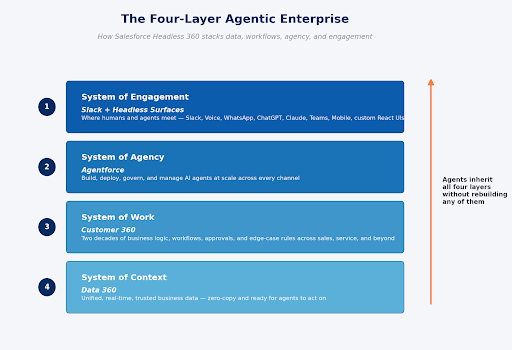
Figure 2 – The four-layer agentic enterprise stack as Salesforce describes it.
The System of Context is Data 360 – unified, real-time, trusted business data, sitting underneath everything. The System of Work is Customer 360 – the actual business logic accumulated across two decades of CRM: approval chains, sharing rules, validation logic, the edge cases legal still depends on. The System of Agency is Agentforce itself, which builds, deploys, and governs the agents that operate against the lower layers. And the System of Engagement is the surface – Slack, primarily, but increasingly any channel where humans and agents converge.
The line Salesforce keeps repeating to make this concrete is that agents inherit all four layers without having to rebuild any of them. A coding agent talking to a raw database has none of this. It does not know that a customer has an open escalation, a renewal due in 30 days, a breached support SLA, and a relationship owner who once played golf with their CFO. That context, that work, that agency, that trust layer – those took years to accumulate. They live on the platform. Headless 360 simply makes them reachable from elsewhere.
| “The surface changes. The platform doesn’t.”
– Salesforce, Headless 360 announcement (April 15, 2026) |
Same Platform, Many Surfaces
The simplest way to grasp what “headless” actually means here is to picture the platform in the middle and the surfaces fanning out around it. The same data, the same workflows, the same trust layer – rendered or invoked from whichever channel is closest to the person or agent doing the work.
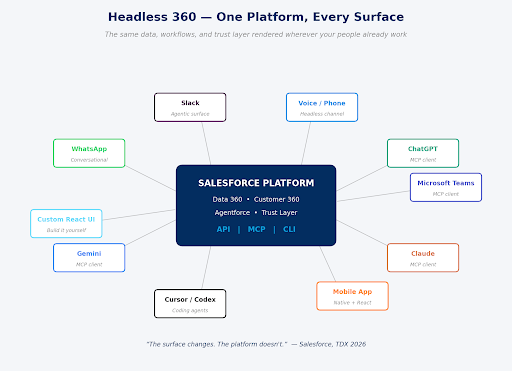
Figure 3 – Headless 360 in one frame: a single platform reachable from any surface that speaks API, MCP, or CLI.
For Slack, this is already concrete. Salesforce reported that custom AI agents inside Slack grew 300% since January 2026, and Slackbot has effectively become the front door to the agentic enterprise – a conversational interface that can coordinate Agentforce agents, Claude, Perplexity, and connected systems without the user context-switching out of the chat. Salesforce architects have begun framing it bluntly: data entry is becoming an agentic responsibility, and humans are spending more time making decisions than entering data.
For MCP-compatible clients – ChatGPT, Claude, Gemini, Teams – the new Agentforce Experience Layer means an agent can present more than text. A flight status card. A rebooking workflow. A decision tile with two buttons. A small embedded data layout. Build it once on the platform and it renders natively wherever the conversation is happening. Voice channels and WhatsApp work the same way. The agent’s logic does not change; only the surface does.
And for the developer, “surface” includes the IDE. Coding agents like Claude Code, Cursor, Codex, and Windsurf are now first-class clients of the platform. They can query org metadata, deploy LWC, validate test runs, and modify permissions – all from inside the editor – through standardized MCP tool calls. To the developer it feels like asking a colleague to do something. Underneath, it is a series of governed API invocations against the same platform that has always been there.
Inside the MCP Layer
Of the three Headless 360 pillars, the MCP layer is the one most likely to reshape how Salesforce work actually gets done in the next twelve months. To understand why, it helps to know what MCP itself is. The Model Context Protocol is an open standard, originally developed by Anthropic, that gives AI applications a consistent way to discover and invoke external tools, data, and prompts. Think of it, as several Salesforce engineers have, as USB-C for AI: a universal connector that replaces the bespoke integration glue every team used to write.
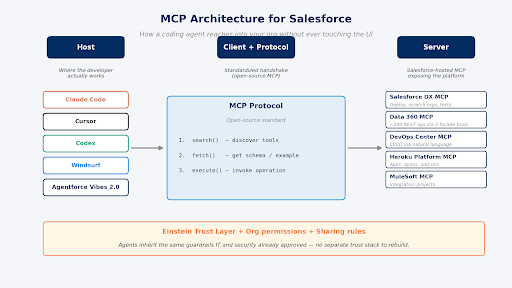
Figure 4 – The MCP host–client–server topology for Salesforce: coding agents on the left, the open-source protocol in the middle, Salesforce-hosted MCP servers on the right.
An MCP stack has three roles. The host is the AI application – Claude Code, Cursor, Codex, Windsurf, or Agentforce itself. The client lives inside the host and speaks the protocol. The server is what the client connects to, and it exposes a defined set of tools, resources, and prompts that the agent can call. At launch, Salesforce shipped a constellation of hosted MCP servers: Salesforce DX MCP for development tasks like deployments and scratch orgs, the Data 360 MCP Server (in developer preview), DevOps Center MCP for pipeline operations, Heroku Platform MCP for app management, and MuleSoft MCP for integration projects.
A worked example: the Data 360 MCP Server
The Data 360 MCP Server is the most architecturally interesting of the batch, because it had to solve a problem that will recur everywhere MCP meets enterprise platforms. Data 360 has roughly 200 distinct REST API operations. Exposing them all individually as MCP tools would simply overwhelm the LLM’s context window. The agent would spend more tokens reading tool definitions than doing actual work.
The engineering team solved this with an approach borrowed from Cloudflare research on MCP tool management at scale: three facade tools – search, fetch, and execute – sitting in front of the full API surface. When an LLM wants to do something, it follows a three-step workflow. It calls search to discover the right capability by intent or keyword. It calls fetch to get a payload example and understand the schema. Then it calls execute to perform the actual operation. Tool families behind the facade keep the underlying API organized; the LLM only sees the tiny abstraction layer.
One Salesforce Ben writer who tried the developer preview reported getting it running through Claude Code on a Mac in under 20 minutes. The setup currently requires Java 17, Maven 3.9, and a Salesforce org with Data 360 enabled; during the preview phase the server runs locally and is single-tenant. When it goes generally available, it will be offered as a Salesforce Hosted MCP Server alongside the rest.
| A USEFUL REFRAME FOR SALESFORCE ADMINS
The most quoted line from the Salesforce Ben preview is worth holding onto: the important shift is not that you no longer need the UI, it is that you are no longer constrained by it. For experienced users, MCP lets you perform more – guided by intelligence layered on top of the platform. For newer users, the guardrails of an agent that already understands org structure reduce the chance of poorly informed clicks. Either way, the work admins did over the last decade – clean data, sensible permissions, thoughtful flows – is exactly what the agent inherits. None of it goes away. |
The Experience Layer: When Conversation Is the Interface
The second pillar, the Agentforce Experience Layer, addresses a problem that has dogged conversational AI from the start: text-only chat is fine for retrieval but terrible for decisions. A support agent asks an LLM to check a customer’s upcoming flight, and the LLM responds with a wall of prose. The user now has to parse it, understand it, decide what to do, and then describe their decision back in another wall of prose. Every step is friction.
The Experience Layer breaks the agent’s logic apart from its presentation. An agent’s job is to do – call an API, run a workflow, fetch a record, propose a rebooking. The Experience Layer decides how that action shows up to the user. Rich interactive components like flight status cards, rebooking workflows, decision tiles, and data layouts get rendered natively inside Slack, and across mobile, ChatGPT, Claude, Gemini, Teams, or any client that supports MCP apps.
The build-once-render-anywhere posture is what makes this strategically heavier than it looks. A team that used to build a Slack app, a mobile screen, and a web component for the same workflow is now building one experience and watching it appear in three places.
For developers who want full control, native React support is now part of the platform. Any design language, any interaction model, any brand expression – built on top of the same headless data and workflow layer. For teams that have spent years constrained by Lightning’s component model, this is the most quietly significant change in the entire release.
| “Work that used to pull people out of the conversation now happens inside it.”
– Salesforce, Headless 360 announcement |
Build, Trust, Tune: The Agent Lifecycle
The third pillar – agent governance – is the one Salesforce talked about most defensively, and for good reason. Shipping an agent is the easy part. Trusting it weeks after launch, across every edge case real user will throw at it, is where most enterprises have been getting stuck.
Agents are fundamentally different from traditional software: they are probabilistic, not deterministic. They do not behave the same way every time. They encounter scenarios nobody anticipated and reason their way to outcomes nobody predicted. There is no bug to fix in the classical sense. There is only behavior to observe, evaluate, and tune.
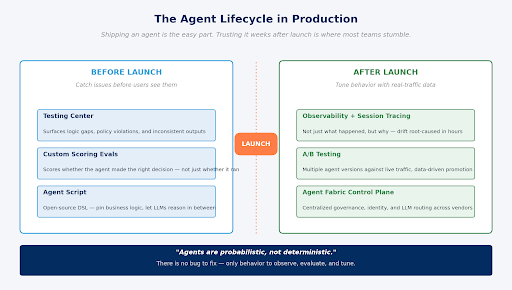
Figure 5 – Headless 360 splits agent governance into two halves: catch problems before launch, tune behavior after.
Before launch: Testing Center, Custom Scoring Evals, and Agent Script
Testing Center surfaces logic gaps, policy violations, and inconsistent outputs before they ever reach users. It goes GA in May 2026. Custom Scoring Evals go a step further: rather than telling you whether an agent ran successfully, they score whether it made the right decision. Teams define what “good” looks like for a use case – for example, a customer service agent that declines an out-of-policy refund while clearly explaining the alternatives – and every response is graded against that standard, not just whether the call returned cleanly.
Agent Script is the most architecturally interesting addition in this set. It is an open-source DSL that lets teams pin specific parts of an agent’s behavior to explicit business logic while leaving other parts free to reason. The framing Salesforce uses is “guided determinism” – fixed handoff rules where they matter, LLM reasoning everywhere else. The pattern matters because it gives architects a structured way to bound the probabilistic surface of an agent without making it useless. Open-sourcing it signals that Salesforce wants the definition language to spread beyond their own platform.
After launch: Observability, Session Tracing, A/B Testing
Once an agent is alive, the question shifts from “is it working” to “why is it behaving the way it is.” Observability and Session Tracing show not just what happened in a session but why – which tools were invoked, which reasoning path was followed, which model was consulted, where the agent diverged from expected behavior. When an agent drifts, the root cause becomes findable in hours rather than weeks.
A/B Testing lets multiple agent versions run against real traffic simultaneously, so teams can promote the winner based on real data rather than vibes. This is the part of the release that sounds the most like mature web ops – and that is the point. Agents are software, and software needs the same release engineering discipline that the rest of the stack has had for two decades.
The Build Loop Collapses
For developers – and for the architects who watch them work – perhaps the most immediate impact of Headless 360 is what happens to the everyday loop of building, deploying, and validating Salesforce work. Pre-Headless, that loop involved a familiar context-switching dance: the IDE for code, DevOps Center for pipelines, Setup for configuration, the sandbox for validation. Four tools, four contexts, four cognitive switches every cycle.
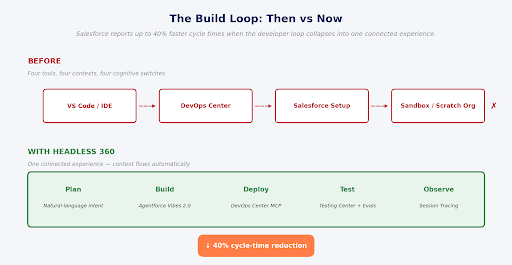
Figure 6 – DevOps Center MCP and Agentforce Vibes 2.0 collapse the four-tool dance into one connected experience.
The DevOps Center MCP and Agentforce Vibes 2.0 collapse most of that into a single conversation. Natural Language DevOps means a developer can describe what they want to deploy in plain English and let an agent handle the validation, the testing, and the actual deployment. Vibes 2.0 brings org awareness, multi-model support – Claude Sonnet and GPT-5 – and an AI development partner that understands not just your code but your business. Salesforce reports cycle-time reductions of up to 40% when teams move to the unified flow.
The pricing model for developers is also worth noting. Every Salesforce Developer Edition org now includes the Agentforce Vibes IDE (a browser-based, cloud-hosted VS Code environment), Agentforce Vibes with Claude Sonnet 4.5 as the default coding model, and Salesforce Hosted MCP Servers – all at no cost. The free tier currently allows 110 requests per month and 1.5 million tokens through May 31, 2026, with usage scaling models thereafter. For a free product, that is generous; for new developers, it is a near-frictionless on-ramp.
What Does This Look Like in Real Enterprises?
It is one thing to read the architecture diagrams; it is another to see what teams are actually doing with them. The Headless 360 launch came with a deliberate set of named customer stories, and a few of them illustrate the spread of use cases concretely.
Indeed: a coding agent inside the developer’s existing tools
At Indeed, Senior Product Manager Oliver Bodden described the team’s use of Agentforce as a way to give coding agents live access to the entire platform from inside the tools developers already used – paired with gating and human-in-the-loop checks. The reported result was faster delivery, more consistent execution, and a clearer path from experimentation to production. The pattern matters: it is not “use an agent instead of a developer,” but “let the developer move faster by delegating routine work to an agent that already understands the org.”
Engine: production-ready agents in 12 days
Engine CEO Elia Wallen reported deploying sophisticated production-ready agents in 12 days, driving millions in savings while increasing technical velocity. The Salesforce framing is that the unified platform proved teams could scale complex service needs without adding operational complexity. The honest read is that for organizations where the workflow logic is already in Salesforce, agents inherit it for free – and that compresses the typical “build a new system” timeline dramatically.
Diabsolut: from days to seconds
John Pettifor, SVP of Innovation at Diabsolut, described using Agent Fabric to coordinate a network of agents safely – kicking off support requests for workshop planning, user stories, and solution design directly inside Slack, with the best-fit resources engaged automatically across Certinia, SharePoint MCPs, Agentforce, and homegrown agents. Tasks that previously took days now complete in seconds.
Alcon: a multi-agent fabric with discovery and intelligent routing
Sreenivasa Patibandla, Director of System Integrations and APIs at Alcon, framed the impact through Agent Fabric: agents discovering each other at runtime, intent-based routing, and a unified umbrella for what would otherwise have been a sprawl of disconnected automation experiments. For large, federated organizations, this is the difference between AI-powered pilots and an actual digital workforce.
Grupo Globo: the everyday productivity story
Adones Guerra, Tech Lead at Grupo Globo, is candid that the high-value moments for his team come from the unglamorous middle – metadata adjustments, configuration analysis, generating boilerplate code, writing tests, handling small refactors, pre-deployment checks. Vibes acts as a strong assistant on the repetitive, time-consuming work that historically ate up developer time. It is the kind of impact that does not appear in keynote demos but adds up to real cycle-time improvement across a team.
Before and After, in One Table
For mixed audiences trying to understand the shift quickly, the simplest framing is a side-by-side comparison of how the same work happened before Headless 360 and how it happens now.
| Workflow | Pre-Headless 360 | With Headless 360 |
|---|---|---|
| Deploying metadata | IDE → DevOps Center → validation in sandbox; manual context switching across four tools | Natural-language DevOps in chat; the agent validates, tests, and deploys end-to-end |
| Querying customer data for context | Custom API wrappers, ad-hoc auth, schema mapping per use case | Data 360 MCP server exposes ~200 REST ops via three facade tools |
| Multi-channel rollout | Separate builds for Slack, mobile, web, voice; redundant logic | Experience Layer renders one build across Slack, mobile, ChatGPT, Claude, Teams |
| Evaluating agent behavior | Logs and manual review; “did it run” is the only signal | Custom Scoring Evals, Session Tracing, A/B Testing against live traffic |
| Trust and permissions | Trust stack rebuilt with every new integration | Agents inherit the same FLS, sharing rules, and profiles already approved |
| Pricing for developers | Code Builder available; Vibes paid; MCP servers in pilot | Free DE org includes Vibes IDE, Claude Sonnet 4.5, and Hosted MCP Servers |
Agent Fabric: The Control Plane for a Multi-Vendor World
Headless 360 did not arrive alone. In the same April 15 wave, Salesforce expanded Agent Fabric – the multi-vendor agent control plane originally launched in September 2025 – with a set of capabilities that matter precisely because most enterprises are not betting on a single AI vendor.
They are running Agentforce agents, OpenAI agents, Gemini agents, internal homegrown agents, and a long tail of MCP servers from partners like Notion, Docusign, Informatica, and Google. The question becomes: who governs all of them?
The Agent Fabric expansion answers that with four moves. Expanded Agent Scanners now automatically discover MCP servers and agents across Amazon Bedrock, Microsoft Foundry, and GoDaddy, registering them centrally with OAuth authentication.
A visual authoring canvas alongside MuleSoft Vibes lets developers map multi-agent workflows and human checkpoints by dragging and dropping. The MCP Bridge enables existing APIs to be made agent-ready without code changes, extending enterprise-grade security and rate-limiting to legacy surfaces. And the AI Gateway now provides LLM Governance – standardized token management, routing rules, and cost controls across the entire multi-model stack from a single point.
Trusted Agent Identity is perhaps the most operationally significant addition: it lets agents execute actions using specific user permissions, with mobile approval requests for high-stakes operations like money movement or legal review. Every privileged action is verified and auditable. For regulated industries, this is the layer that makes “let the agent do it” survivable in a compliance review.
The Uncomfortable Question: Who Is This For?
Not every voice in the ecosystem has read Headless 360 the same way. Vernon Keenan, writing for SalesforceDevops.net the same day as the announcement, characterized it as a play for the “Claude-pilled generation” – developers who build by conversing with AI models, who think in MCP tools and API-first architectures, and who have never clicked through a Salesforce Setup menu and don’t intend to start. The analysis is sharp, and worth sitting with.
Most of what was announced – Headless 360, MCP tools, Agent Script, native React, ADLC skills, Hosted MCP Servers – is a pro-code menu. The framing of “vibe coding” makes it feel accessible, and to be fair it does lower the syntactic bar. But the underlying skillset is still software engineering. When Salesforce says agents will write Agent Script for you, that is true. Someone still has to prompt, evaluate, debug, test, and deploy what the agent produces. That someone needs to understand structured type systems, API architectures, Salesforce CI/CD pipelines, and LLM behavior. Those are not the skills the traditional Trailblazer community was originally trained in.
Salesforce has a counterargument, and it is a strong one. The work admins and analysts have built – the flows, the approval chains, the data models, the validation rules – is exactly what Headless 360 exposes to agents.
The admin’s work becomes the intelligence the agent inherits and operates within. In that sense, admins are not being replaced; their existing artifacts are becoming dramatically more valuable. But the new development tooling is clearly aimed at developers, and admins who want to stay relevant in the agentic era will benefit from learning how MCP works, how Agent Script is structured, and how to think in terms of evaluation rather than configuration.
| HONEST READ FOR THE TRAILBLAZER COMMUNITY
If you are a Salesforce developer, the next twelve months are the most expansive your tooling has been in years. If you are an admin, you have a choice between deepening into Agent Script and Testing Center configuration (very feasible, no Apex required) or watching pro-code reclaim ground low-code has held for a decade. The bridge is real, but it requires actually walking across it. |
Getting Started: What to Do in Your First Hour
For a platform announcement, Headless 360 has an unusually concrete getting-started path. For developers, the starting point is straightforward.
- Sign up for or refresh a Salesforce Developer Edition org. The DE tier is free, does not expire as long as you log in regularly, and now ships with everything you need to experiment.
- Open Setup and launch Agentforce Vibes. The IDE is a browser-based VS Code with Salesforce extensions, CLI, and GitHub integration preconfigured – no local installation, no manual authentication.
- In Vibes, enable Claude Sonnet 4.5 (the default model in DE), and try a scoped request: “Create an Apex before-insert trigger on Lead that prevents duplicate Email values.” Vibes reads your actual org schema before generating, so its output is grounded in your metadata.
- Configure a Hosted MCP Server in your Vibes session, then connect Claude Desktop or Cursor to it. Try a natural-language query: “List my high-priority open cases from the last 7 days.” The agent will go through search, fetch, and execute against the platform.
- Explore Agent Script in the open-source repo. Even reading the DSL syntax will tell you a lot about how Salesforce thinks about bounding agent behavior.
- When you are ready for production, look at Testing Center (GA May 2026) for pre-launch evaluation, and at the Agent Fabric AI Gateway for centralized LLM governance.
Limitations, Risks, and What to Watch
No platform shifts this large land without rough edges. A few are worth naming honestly.
-
Pricing remains partially opaque
The Developer Edition tier is generous. Enterprise production pricing for the full Headless 360 stack has not been publicly disclosed, and analysts have started asking pointed questions. The current DE quota of 110 requests per month and 1.5M tokens through May 31, 2026, will satisfy most exploration but not heavy use. Teams evaluating production deployment should expect to negotiate, and should price in the model-routing economics (Claude Sonnet, GPT-5, Salesforce-managed models) carefully.
-
The trust layer assumes the org is well-governed
Headless 360 inherits the FLS, sharing rules, and profile permissions you already have. If those are messy – over-permissive profiles, stale permission set assignments, orphaned external client apps – then so is the surface your agents operate against. The platform shift is also, quietly, a permissions audit forcing function. Many teams will find their first month with MCP-enabled agents in production reveals more about their existing permission model than they wanted to know.
-
Multi-vendor agent sprawl is a real operational risk
Agent Fabric is the answer to this, and it is a good one. But standing it up requires real effort: scanning, registering, governing, and routing across vendors does not happen by accident. The teams that succeed with multi-vendor agentic stacks will be the ones that invest in the control plane early rather than discovering they need it after the seventh disconnected pilot.
-
The probabilistic problem does not go away
Testing Center, Custom Scoring Evals, Agent Script, A/B Testing – these are all enormous improvements over where most teams were last year. They are not, however, a guarantee. Agents will still occasionally do unexpected things in production. Strong governance reduces the frequency and the blast radius; it does not eliminate them. Enterprises should expect to staff agent operations the way they staffed devops in the 2010s – as a real function, not as a side responsibility.
Final Thoughts: What This Actually Changes
Salesforce has done one thing genuinely well with Headless 360: it has translated a multi-year architectural rebuild into a story enterprise buyers can understand in a single sentence. Everything on Salesforce is now an API, an MCP tool, or a CLI command. Agents can use all of it. The platform stays where it has always been; the surface moves to wherever the work is happening.
For architects, the implication is concrete. The four-layer model – context, work, agency, engagement – is now individually programmable at each layer, and the integration patterns the company has been publishing in its enterprise agentic architecture guidance translate directly into MCP-flavored implementations. The work of designing for the agentic enterprise has just gotten substantially less abstract.
For developers, the everyday loop has collapsed. Code, deploy, test, observe – done in one connected experience, often inside a single conversation with an agent that already understands the org. Cycle times down 40% is the headline number; the quieter effect is that the cognitive load of switching between tools simply goes away.
For admins, the artifacts you have built for years – flows, approval chains, validation rules, sharing models – are about to be inherited by every agent in the org. Your work becomes more valuable, not less. The challenge is whether you choose to step into the new tools (Testing Center, Agent Script, Eval design) or hand that territory over to developers by default.
For business stakeholders, the practical effect is that more work can be expressed as conversations instead of tickets. Hire faster, close cases faster, run experiments faster, with less of your team’s time spent moving between tools. The promise is real. The discipline required to realize it – governance, evaluation, audit trails, vendor management – is also real, and underestimating that is the most common failure mode.
Two years ago, Salesforce made a quiet bet that the Salesforce AI agent – not the human user – would become the dominant consumer of its platform. Headless 360 is the moment that bet became visible. Whether you log into Salesforce less often as a result is up to you. The platform, increasingly, does not require it.
FAQs
What is Salesforce Headless 360?
Salesforce Headless 360 refers to the latest architecture designed by Salesforce in which all key functionalities of the platform will be available via APIs, MCP, or commands via CLI rather than being available solely on the traditional UI of the Salesforce platform. The Headless approach makes Salesforce a programmable and multi-surfaced platform that supports Slack, ChatGPT, Claude, IDEs, mobile apps, and custom apps.
What is meant by “headless” in Salesforce Headless 360?
Here, the term “headless” refers to Salesforce features being disconnected from the usual user interface. The exact same information, automation, business logic, and workflow can now be used on various surfaces including Slack, WhatsApp, ChatGPT, Claude, mobile applications, and even when coding.
What is the goal of the Testing Center in Headless 360?
The Testing Center allows organizations to discover violations of policy, logic flaws, and output inconsistencies prior to deployment of AI agents into production environments. This is done in order to enhance governance and mitigate risk for agentic workflows.
How does Headless 360 alter the responsibilities of Salesforce administrators?
Headless 360 adds value to the work that has been done by Salesforce administrators since AI agents will inherit whatever configuration the administrator set up, including flows, validation rules, permission settings, and approval processes. In addition, it is advisable for Salesforce administrators to get acquainted with tools such as Agent Script, MCP, and Testing Center.
What’s the biggest innovation of Salesforce Headless 360?
The biggest revolution here is that Salesforce is not anymore a web-only customer relationship management (CRM) system. It is evolving into an API-first and artificial intelligence-driven infrastructure platform accessible from almost all applications, virtual assistants, and digital screens.
For more insights, updates, and expert tips, follow us on LinkedIn.
PRIMARY SOURCES
- Salesforce Newsroom – “Introducing Salesforce Headless 360. No Browser Required.” (April 15, 2026)
- Salesforce Newsroom – “Salesforce Advances Agent Fabric” (April 15, 2026)
- Salesforce Ben – “Salesforce Headless 360 and Agentforce Vibes 2.0 Revealed at TDX 2026”
- Salesforce Ben – “Salesforce Headless Data 360: A First Look at the New MCP Capabilities”
- SalesforceDevops.net – “TDX 2026 Reporter’s Notebook: Salesforce Goes Headless”
- Salesforce Developers Blog – “Introducing the Data 360 MCP Server (Developer Preview)”
- Salesforce Developers Blog – “Introducing MCP Support Across Salesforce”
- Salesforce Developers Blog – “New in Salesforce Developer Edition: Agentforce Vibes IDE, Claude 4.5, MCP”
- Salesforce Architects – “Enterprise Agentic Architecture and Design Patterns”
- Salesforce – “Architect the Future UI: Slack as Your Agentic Surface”
About the diagrams
All six architecture visualizations in this article are original, produced specifically for this piece to illustrate the concepts in Salesforce’s public announcements. They are not reproductions of Salesforce-published assets and should be credited to this publication if reused.