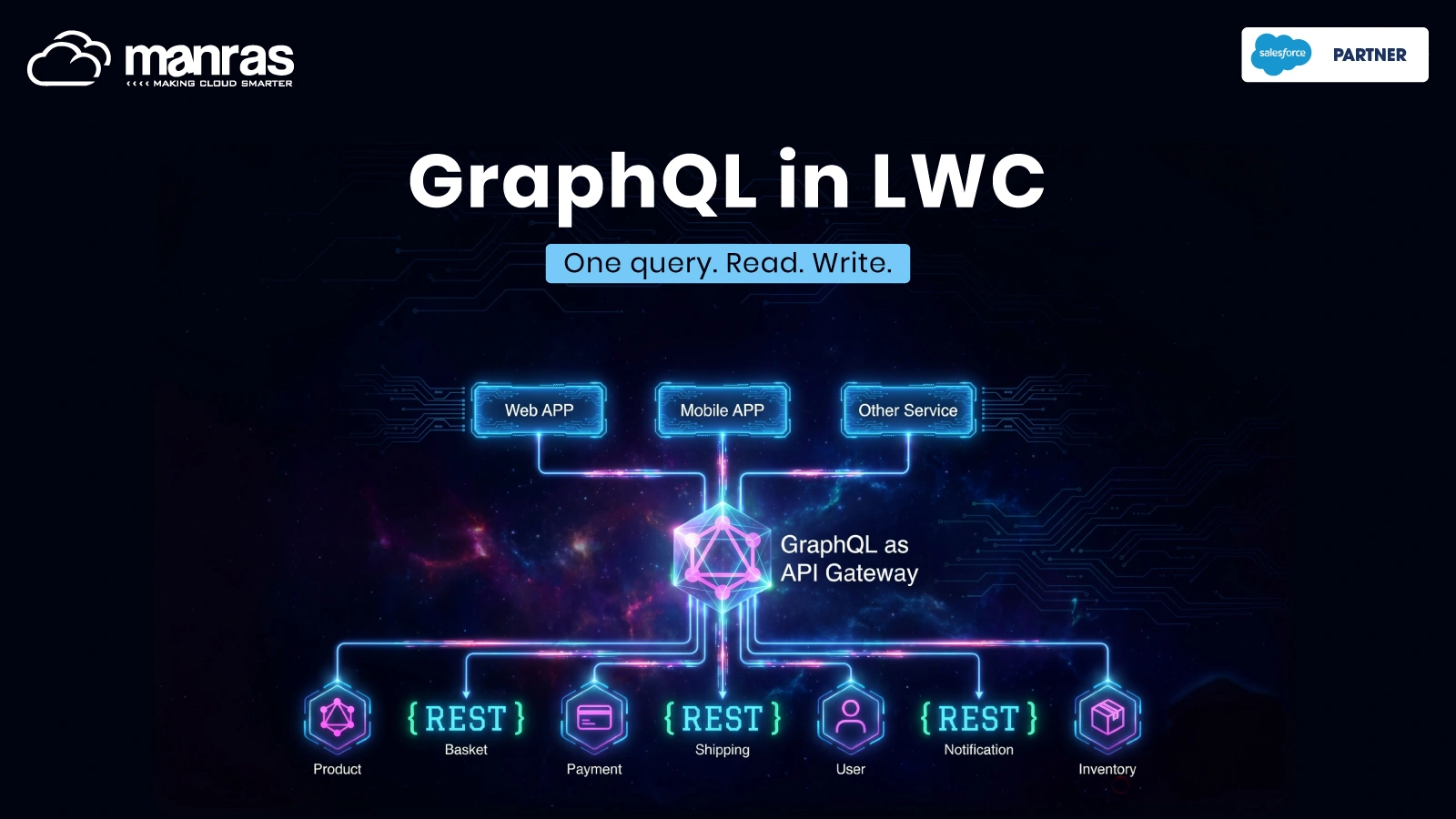
GraphQL in Lightning Web Components: One Query, Read and Write
One account card, ten requests down to one, and since Spring ’26 a way to write the data back. What changed, and what to do about it before Winter ’27.
For three years GraphQL in Lightning web components was a reading tool for a narrow group of front-end developers. Winter ’26 gave it a new module, Spring ’26 added mutations, and Summer ’26 carried the same API into React. This post follows one account card from ten requests to one, shows the write-back, and says where the approach loses.
“In short, everything returned back to you that isn’t the user’s phone number is wasted data.”
Spencer MacKinnon and Ben Sklar, introducing the Salesforce GraphQL API, March 2022
A ten-request habit, quietly broken
Open any account record page and it looks simple: a name, an industry, a few contacts, a few open cases. Open the network tab while it loads and count. On a standard Account page in a Developer Edition org, one load made 31 Aura requests, ten of them fetching data: four getRecordWithFields calls, three related-list record calls and three related-list metadata calls, before a single custom component ran. Your count will differ with your page layout; the pattern will not. That is how Lightning has always worked. One adapter per shape of data, one round trip per adapter, and anything the adapters cannot express pushed into Apex, where the Lightning Data Service cache cannot see it and the same record can be fetched twice and shown in two states.
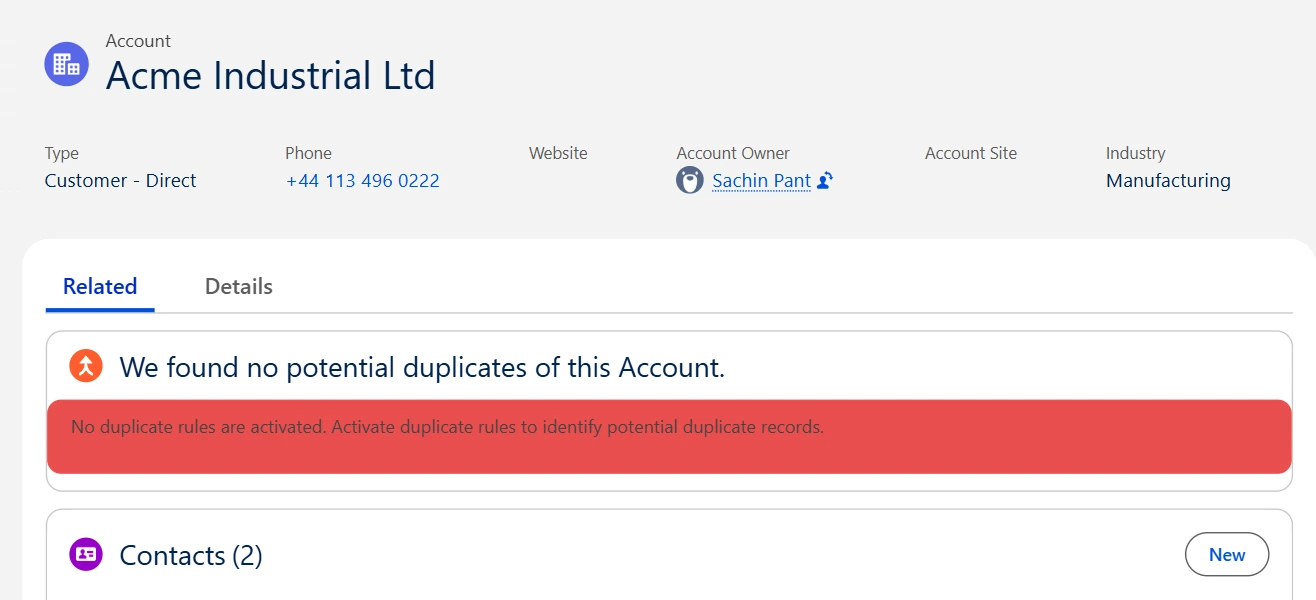
Figure 1. The running example: a standard Account record page with contacts and open cases below. Any account in any org will do; this one is Developer Edition sample data. Screenshot: Developer Edition sample data.
The 2022 quote above was written about the REST-style APIs behind pages like this one, and it took four years for the fix to reach a Lightning web component in full. GraphQL in LWC turns the page into one declared query and one response in the requested shape. Since Winter ’26 the lightning/graphql module also tolerates fields the user cannot see, and since Spring ’26 it writes records with executeMutation. This post builds an account card end to end: the query, the write-back, and where the approach stops. It uses only standard objects, so it runs unchanged in any org.
If you only read one paragraph
GraphQL lets a component ask for exactly the fields it needs, across several objects, in one request. Lightning Data Service caches the answer and shares it with everything else on the page. Since Spring ’26 the same component can also write records. Permissions do not change: the query runs as the current user, and field-level security, object permissions and sharing rules decide what comes back.
Why the timing matters
Reading was never the whole job.
Until Spring ’26 a GraphQL component could show a case but not close it, so every real screen still needed an Apex controller or a second adapter. executeMutation removes that last excuse, and this is the first release cycle in which a data-dense screen can be built end to end with one module.
The skill now transfers.
Salesforce Multi-Framework reached GA on 16 July 2026, and its Data SDK exposes graphql.query and graphql.mutate against the same uiapi schema. The account card query in this post runs unchanged in a React app on the platform.
Winter ’27 is a quiet release for the adapter.
Its Lightning Components notes carry no GraphQL items, so what you learn now is stable through at least the 3 and 10 October production windows. The one admin-facing change, control over guest-user access to the GraphQL API, needs checking before those dates if you run public sites.
What changes for each role
| Role | One sentence |
| Admin | Nothing to enable; the permission model you already maintain is the only gate, and Winter ’27 adds a control over guest-user access to the GraphQL API for public sites. |
| Developer | The account card is one @wire and one mutation instead of three adapters plus an Apex controller and its test class. |
| Architect | A cache-aware read path that scales with page complexity, and the same query language now serves React apps on the platform through Multi-Framework. |
| PM or BA | Adding a column to a list is a one-line query edit, not an Apex change plus a test class; requirements should still name the persona, because results depend on who runs the query. |
| QA | Less Apex means fewer unit tests, but the same component legitimately shows different data to different profiles, so test per persona. |
Four years from announcement to read-write
The story starts in March 2022, when Salesforce announced a GraphQL endpoint for the UI API with three promises: field selection, several resources in one request, and a schema you could introspect. It reached general availability in Winter ’23, but only as a REST endpoint. A Lightning web component still had to call it through Apex or fetch, which bypassed the Lightning Data Service cache.
The wire adapter closed that gap in three steps over 2023: a pilot in Spring ’23, a beta in Summer ’23 that shipped sample components to the lwc-recipes repository, and general availability in Winter ’24 with aggregates and a best-practice guide. Salesforce’s own GA post called native querying from components “a top request from our developer community”. For the next two years the adapter was useful and stable, and it stayed read-only.
Winter ’26 changed the module rather than the language. lightning/graphql superseded lightning/uiGraphQLApi and added two things that made shared components practical: the @optional directive, so a query survives a user who cannot see one of its fields, and dynamic query construction. Both are gated at API 65.0. Spring ’26 added executeMutation to the same module, and Summer ’26 put the same uiapi schema behind React through Multi-Framework. Winter ’27 adds nothing to the adapter, so the surface is settled enough to build on.
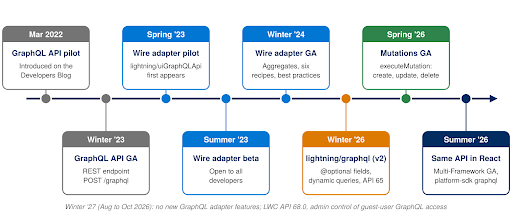
Figure 2. Release timeline. Blue is the original wire adapter; orange and green are the Winter ’26 and Spring ’26 changes this post is about.
A correction worth repeating
The lightning/graphql module debuted in Winter ’26, not Spring ’26. The Winter ’26 developer guide on the Salesforce Developers Blog announced it, and @optional and dynamic queries are documented as requiring API 65.0, the Winter ’26 API version. Spring ’26 is when mutations became generally available in it. The May 2026 mutations post from Salesforce blurs the two, so expect the confusion elsewhere.
Inside the query
Every record query has the same skeleton: uiapi, then query, then the object with SOQL-like arguments, then edges and node, then fields. Fields are objects, not scalars, so you ask for value (raw) or displayValue (formatted for the user’s locale). The connection pattern of edges, node and pageInfo is standard GraphQL; the uiapi root and the value and displayValue shape are Salesforce-specific, and they are what let Lightning Data Service understand what came back and share it with every other adapter on the page.
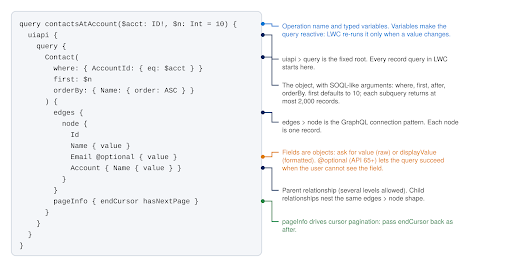
Figure 3. One query, annotated. Arguments filter, sort and page; the node lists the fields; pageInfo carries the cursor for the next page.
The card needs the account, its contacts and its open cases. Child relationships nest the same edges > node shape under the parent, each with its own filter, sort and page size, so the three lists become one document. The documented ceilings are generous for a screen: up to 55 child-to-parent relationships across up to five levels, 20 parent-to-child relationships one level deep, 10 subqueries per request and 2,000 records per subquery.
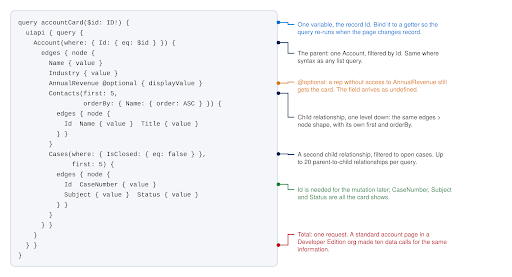
Figure 4. The whole card in one query, for any account. Ten data calls on the standard page become one request here.
Building the account card
The component below is complete and deployable on any Account record page. The record Id comes from the page through @api recordId, the getter makes the query reactive, and the same class closes a case with executeMutation. Mutations go through the UI API, so the standard save path applies: permissions, validation rules, triggers and flows behave exactly as they would from a record page.
Reproduce it in ten minutes, in any org
Standard objects only: Account, Contact, Case. Pick any account with contacts and at least one open case (Developer Edition sample data has several), deploy accountCard with a simple template, and drop it on the Account record page in App Builder. The @optional line needs API 65.0 or later; delete it on older API versions. Then open the network tab.
accountCard.js, complete. The template loops over contacts and cases and puts data-id on a Close button.
import { LightningElement, api, wire } from ‘lwc’;
import { gql, graphql, executeMutation } from ‘lightning/graphql’;
const CARD = gql`query accountCard($id: ID!) { uiapi { query {
Account(where: { Id: { eq: $id } }) { edges { node {
Name { value } Industry { value } AnnualRevenue @optional { displayValue }
Contacts(first: 5, orderBy: { Name: { order: ASC } }) {
edges { node { Id Name { value } Title { value } } } }
Cases(where: { IsClosed: { eq: false } }, first: 5) {
edges { node { Id CaseNumber { value } Subject { value } } } }
} } } } } }`;
const CLOSE_CASE = gql`mutation closeCase($input: CaseUpdateInput!) {
uiapi { CaseUpdate(input: $input) { Record { Id Status { value } } } } }`;
export default class AccountCard extends LightningElement {
@api recordId;
account; contacts = []; cases = []; errors; refreshCard;
@wire(graphql, { query: CARD, variables: ‘$variables’ })
wiredCard({ data, errors, refresh }) {
if (refresh) this.refreshCard = refresh; // v2: refresh rides on the result
this.errors = errors; // plural, per the GraphQL spec
const node = data?.uiapi.query.Account.edges[0]?.node;
if (!node) return;
this.account = { name: node.Name.value, industry: node.Industry.value,
revenue: node.AnnualRevenue?.displayValue }; // undefined if hidden
this.contacts = node.Contacts.edges.map(e =>
({ id: e.node.Id, name: e.node.Name.value, title: e.node.Title.value }));
this.cases = node.Cases.edges.map(e =>
({ id: e.node.Id, number: e.node.CaseNumber.value, subject: e.node.Subject.value }));
}
get variables() { return { id: this.recordId }; }
async closeCase(event) {
const result = await executeMutation({ query: CLOSE_CASE,
variables: { input: { Id: event.target.dataset.id, Case: { Status: ‘Closed’ } } } });
if (result.errors) { this.errors = result.errors; return; }
await this.refreshCard?.(); // the open-cases list will not drop it on its own
}
}
Three details in the class matter. The result object exposes errors in the plural, an array, to match the GraphQL specification, and a response can carry both data and errors when part of a query succeeded, so check errors first. The AnnualRevenue field is marked @optional, so for a user who cannot see it the query still succeeds and the field arrives as undefined; the template has to be designed for both states, because the same component will render differently for a sales rep and a finance user. And executeMutation is imperative only. It is not supported with @wire, which is the right constraint: a write should happen because the user did something, not because a property changed.
Writing back, and what the cache does next
The last line of closeCase catches people. Closing a case is an update, and Lightning Data Service propagates updated fields to every adapter holding that record, but it does not re-evaluate the IsClosed = false filter, so the closed case stays in the list until you refresh. Deletes are removed from wired results automatically. Creates are never added until you refresh, whatever the filter. In v2 the refresh method rides on the emitted result, which is why the wire function stores it; v1 needed a separate refreshGraphQL(result) import.
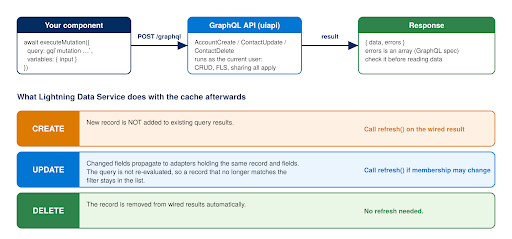
Figure 5. The mutation round trip, and what Lightning Data Service does to the cache after each kind of write.
| Operation | Mutation shape | What the cache does afterwards |
| Create | ContactCreate(input: { Contact: { FirstName: “…”, LastName: “…” } }) { Record { Id } } | The new record is not added to existing query results. Call refresh() on the wired result. |
| Update | ContactUpdate(input: { Id: “…”, Contact: { Phone: “…” } }) { Record { Id } } | Changed fields propagate to any adapter holding the same record and fields. The filter is not re-evaluated, so refresh if the record could leave the list. |
| Delete | ContactDelete(input: { Id: “…” }) { Id } | The record is removed from wired results automatically. No refresh needed. |
Wrap executeMutation in try / catch as well as checking errors: network and framework failures reject the promise, while validation and permission failures resolve with an errors array. Two things a mutation cannot do are query child relationships in its response and touch objects the UI API does not support. For those, and for anything that must be transactional across several records, Apex is still the answer.
Five things that will bite you
- Aliases on custom fields. Write Picture__c: Picture__c so a rename never breaks your JavaScript. Aliases are not supported on standard fields.
- `totalCount` is not free. Salesforce warns it has performance implications on large or complex queries. Request it only when the UI shows it.
- No polling. Never call refresh() from setTimeout or setInterval. Refresh once after a write or on a user action.
- Ten records by default. A subquery returns 10 records unless you say otherwise and at most 2,000; design for cursor pagination with pageInfo and after from the start, and keep the page size constant for a collection.
- Dynamic queries lose referential integrity. ${} interpolation into gql works since API 65.0, but renames are not tracked for the dynamic part.
Before and after, in one table
The account card is one screen. The table below is the same change measured in the work a team does every sprint, which is where the argument for GraphQL is strongest and where its limits show.
| Everyday task | Before: standard adapters plus Apex | With lightning/graphql |
| Show an account, its contacts and its open cases | Three wire adapters, or one Apex controller with a test class; three response shapes to reconcile | One query, one response in the requested shape, one place to change |
| Add a column to the list | Edit the Apex SOQL, the wrapper class, the test class; deploy | Add one field to the query; the template picks it up |
| Filter or sort a related list | One getRelatedListRecords per list with its own where and sortBy, and no way to fetch the parent in the same call | where, orderBy and first on the child relationship, in the same request as the parent |
| Close a case from a custom screen | Apex DML or updateRecord, then a manual refresh of whichever adapters held it | executeMutation, then refresh() on the card |
| Hide a field from some profiles | optionalFields on getRecord; nothing equivalent in the v1 adapter, so a second query per profile | @optional on the field; the query succeeds and the field arrives as undefined |
| Security review | Explain the sharing keyword, WITH SECURITY_ENFORCED, stripInaccessible | One sentence: the query runs as the user through the UI API |
| Data the user must not normally see | Apex without sharing, with explicit justification | Not possible, by design; stay in Apex |
Migrating from the first module
Components written against lightning/uiGraphQLApi keep working, and the query language is identical. Everything new, including mutations, lives in lightning/graphql, so migrate. For most components it is mechanical: change the import, replace refreshGraphQL(this.result) with the stored refresh(), and bump the component API version. Keep v1 only where the component must work in Mobile Offline.
| Concern | lightning/uiGraphQLApi (v1) | lightning/graphql (v2) |
| Status | Supported, no new features | Recommended for all new work |
| Import | import { gql, graphql } from ‘lightning/uiGraphQLApi’ | import { gql, graphql, executeMutation } from ‘lightning/graphql’ |
| Optional fields | Not available | @optional directive (API 65.0) |
| Dynamic query text | Not supported (${} blocked) | Supported; referential integrity not preserved for dynamic parts |
| Mutations | Not available | executeMutation |
| Refresh | refreshGraphQL(result) imported separately | refresh() method on the emitted result |
| Mobile Offline | Supported | Not currently supported |
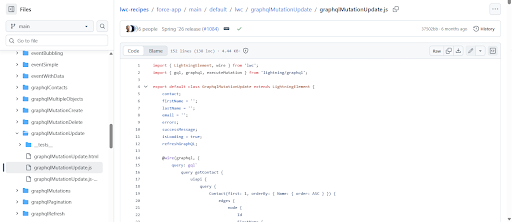
Figure 6. The graphqlMutationUpdate recipe in the lwc-recipes repository, alongside the other eight GraphQL recipes. All of them import from lightning/graphql, so the repository is the fastest way to see v2 idioms in working code. Source: github.com/trailheadapps/lwc-recipes.
The uncomfortable question: where does GraphQL lose?
A fair critic of this post would say it proves too much. The account card is the screen GraphQL was built for, and most components are not that screen. A form that edits one record is simpler with getRecord and lightning-record-edit-form, which give you the layout, the field labels and the save path for free. A parent-and-children save that must succeed or fail together cannot be expressed as a mutation at all, because each mutation is one record with no transaction around it.
Anything that needs a callout, a platform event or an object outside the UI API is Apex whether you like it or not. And the adapter lags the API: new GraphQL API capabilities can take several releases to reach lightning/graphql, so a feature in the API guide is not a promise for the component. Mobile Offline still requires the old module.
All of that is true. It is an argument against using GraphQL everywhere, and no one is proposing that. GraphQL does not replace the single-record adapters or Apex. It replaces the awkward middle: the screens that needed a controller only because the standard adapters could not express a filter or a join, which in most orgs is where the controllers, the wrapper classes and the test classes pile up.
Take those out and what remains in Apex is the code that should be there, transactions and integrations, which is easier to review and easier to defend. Security review gets shorter for the same reason. A GraphQL query has no permissions of its own; it runs as the logged-in user through the UI API, which enforces object permissions, field-level security and sharing on every request. If a screen must show data the user cannot normally see, GraphQL is the wrong tool and Apex with explicit justification is the right one.
“A query cannot see a field the user cannot see. That sentence closes most security review questions before they are asked.”
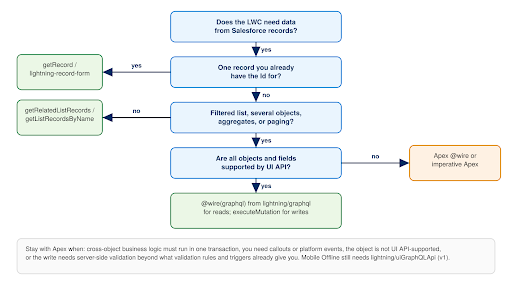
Figure 7. Where GraphQL fits between the single-record adapters, the list adapters and Apex. The decision tree we use in design reviews.
Honest read for the Trailblazer community
The “ten requests become one” figure in this post is a request count from one Developer Edition page load, not a latency benchmark, and the GraphQL side is structural (one @wire, one POST) rather than measured. The user-visible gain is real on data-dense screens and small on a page that already fits one adapter. Measure your own page before promising numbers to a steering committee, and remember that the response is still one payload: a query that pulls five relationships at 2,000 records each is one request and a very slow one.
Getting started: what to do in your first hour
- Open the network tab on a record page you own and count the data requests. That number is your before.
- Create a scratch org or use a Developer Edition org on API 65.0 or later, and deploy accountCard from this post with a template that loops over contacts and cases.
- Drop it on the Account record page in App Builder, open an account with contacts and an open case, and count again.
- Log in as a user with a restricted profile and open the same page. Watch AnnualRevenue disappear without an error. That is @optional working, and QA needs to know it is expected.Click Close on a case. Notice that it stays in the list until refresh() runs, then read the cache table above once more.
- Clone the lwc-recipes repository and read graphqlPagination and graphqlMutationCreate. They are the two idioms the account card does not show.
- Pick one component in your org that has an Apex controller only because of a filter or a join, and rewrite it. Keep the Apex test class count as your after.
Limitations, risks, and what to watch
- Hard limits. 2,000 records per subquery and 10 records by default, 10 subqueries per request, 55 child-to-parent relationships across up to five levels, 20 parent-to-child one level deep. Variables inside @skip and @include are not supported. UI API objects only.
- No transactions. Each mutation is one record. A parent-plus-children save that must succeed or fail together belongs in Apex.
- Two modules for a while yet. Mobile Offline needs lightning/uiGraphQLApi; everything new needs lightning/graphql. An org with field-service components will carry both.
- Feature lag. Check the LWC reference, not only the GraphQL API guide, before promising a capability to a stakeholder.
- Persona-dependent output. @optional means the same component legitimately shows different data to different users. Add a persona test to the definition of done or QA will file it as a bug.
- Guest users. Winter ’27 lets admins control guest-user access to the GraphQL API. If public Experience Cloud pages use GraphQL components, confirm the setting in a sandbox preview before the October production windows.
- What to watch. Multi-Framework is the same schema in React, and micro-frontends and further framework support are expected to be announced at Dreamforce on 15 to 17 September 2026. Anything announced there builds on this schema, so there is no reason to wait for it.
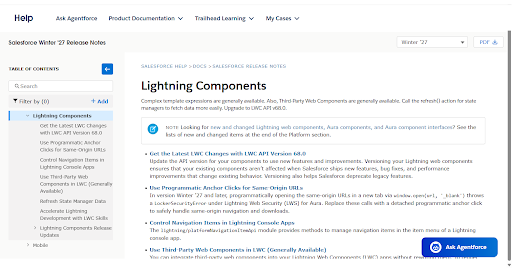
Figure 8. The Lightning Components section of the Winter ’27 release notes: API 68.0, third-party web components, state manager refresh. No GraphQL adapter items. Source: Salesforce Help.
Final thoughts: what this changes
Go back to the account page at the top of this post. Nothing about it looked broken. The ten-request habit was invisible because every adapter did its job and the cost was paid in round trips, in Apex classes and in the test classes behind them.
For an admin, GraphQL changes nothing you have to enable and one thing you should check, the guest-user setting, before Winter ’27 lands. For a developer, it changes the default: the first question about a data-dense screen is now “what is the query?” rather than “what does the controller return?”.
For an architect, it changes what belongs in Apex, and it is the data layer your team will use again in React on the platform. For a PM or BA, it changes the cost of a column from a deployment to an edit, and it changes nothing about the need to name the persona in the requirement. For QA, it means fewer unit tests and one new kind of test.
Ben Sklar and Stephen Carraway put the Spring ’26 release in one line: mutations “fully unlock bulk updates and tree saves for Lightning Web Components (LWC) without custom Apex”. Four years after the phone-number quote, the wasted data is gone from the read and the custom Apex is gone from the write. What is left in Apex is the code that has a reason to be there.
What to do next
| If you are… | Do this next | Why |
| New to GraphQL in LWC | Deploy accountCard above to a scratch org and watch the network tab. | Ten data calls become one. |
| On lightning/uiGraphQLApi | Migrate one component to lightning/graphql; add @optional to profile-dependent fields. | Mechanical, and it unlocks mutations. |
| Writing simple forms in Apex | Replace single-record create, update and delete controllers with executeMutation. | The platform enforces permissions, not your class. |
| Architect or admin | Use the decision tree in design reviews; add a persona test to definition of done. | The same component shows different data to different users by design. |
FAQs
What is GraphQL in LWC?
GraphQL in LWC enables a component to request specific fields from several related Salesforce objects within one query. With lightning/graphql, the response matches the structure of the request. Also, Lightning Data Service manages the returned data caching and sharing.
Can GraphQL in LWC perform CRUD operations on Salesforce records?
Yes. Starting from Spring ’26, lightning/graphql supports mutations using the executeMutation function, which helps to create, update, and delete records via the UI API.
Is GraphQL in LWC an alternative to Apex?
No. GraphQL is a great substitute for Apex in cases when a component requires related records, filtration and sorting, and standard CRUD operations. Apex is useful for transactions, integrations, callouts, API objects not available in the UI API, and data not appropriate to expose via the UI API.
How does GraphQL in LWC secure Salesforce data?
GraphQL works in the context of the logged-in user. It is object permissions, field-level security, and sharing rules that define the data access level of a component. The @optional directive can make a request continue even when the user cannot access a specific field.
How do we distinguish between lightning/uiGraphQLApi and lightning/graphql?
lightning/graphql is a new GraphQL module that replaces lightning/uiGraphQLApi. It has some new capabilities, such as @optional, dynamic queries, and executeMutation mutations.
What are the most significant GraphQL limitations in LWC?
These are just some of the limitations mentioned in the article: up to 2,000 records per subquery; up to 10 subqueries per request; up to 20 parent-to-child relationships one level deep; up to 55 child-to-parent relationships for five levels.
For more insights, updates, and expert tips, follow us on LinkedIn.
Primary sources
| 1. Introducing the Salesforce GraphQL API (Salesforce Developers Blog, Spencer MacKinnon and Ben Sklar, March 2022). developer.salesforce.com/blogs/2022/03/introducing-the-salesforce-graphql-api
2. The Wait Is Over: The GraphQL Wire Adapter for LWC Is Now Generally Available (Salesforce Developers Blog, September 2023). developer.salesforce.com/blogs/2023/09/graphql-wire-adapter-is-generally-available 3. The Salesforce Developer’s Guide to the Winter ’26 Release (Salesforce Developers Blog, September 2025). developer.salesforce.com/blogs/2025/09/winter26-developers 4. GraphQL Mutations Now Available in LWC (Salesforce Developers Blog, Ben Sklar and Stephen Carraway, 5 May 2026). developer.salesforce.com/blogs/2026/05/graphql-mutations-now-available-in-lwc-create-update-and-delete-records 5. lightning/graphql Wire Adapter (v2), executeMutation, refresh (LWC Developer Guide). developer.salesforce.com/docs/platform/lwc/guide/reference-lightning-graphql-module.html 6. GraphQL Wire Adapter Best Practices and Limitations (GraphQL API Developer Guide). developer.salesforce.com/docs/platform/graphql/guide/graphql-wire-lwc-best.html |
7. Query Objects (the @optional directive) and Query Limits (GraphQL API Developer Guide). developer.salesforce.com/docs/platform/graphql/guide/query-record-objects.html
8. lwc-recipes GraphQL components (GitHub, trailheadapps). github.com/trailheadapps/lwc-recipes 9. Salesforce Winter ’27 Release Notes: Lightning Components (Salesforce Help, August 2026). help.salesforce.com/s/articleView?id=release-notes.rn_lc.htm&release=264&type=5 10. Build with React on Salesforce: Multi-Framework Is Now GA (Salesforce Developers Blog, 16 July 2026). developer.salesforce.com/blogs/2026/07/build-with-react-on-salesforce-multi-framework-is-now-ga 11. Salesforce Teases Pre-Dreamforce Updates: What’s Next for Headless? (Salesforce Ben, 17 August 2026, updated 21 August). www.salesforceben.com/salesforce-teases-pre-dreamforce-updates-whats-next-for-headless/ |
About the diagrams. The timeline, query anatomy, account card, mutation round trip and decision tree were drawn for this post from the sources above. The request count comes from one load of a standard Account page in a Developer Edition org, captured in the browser’s network tools; the screenshot shows Developer Edition sample data with fictional names. Nothing in the figures is a Salesforce asset.