

Simple Sales Pipeline Setup for SMBs Using Salesforce CRM
It is a known fact that most Small and Medium Businesses (SMBs) start off their sales procedures with spreadsheets, sticky notes, and a lot of follow-ups are done manually. However, when the lead numbers start to grow, managing these numbers becomes messy. That is why implementing and executing a Salesforce CRM for SMB smoothly is a necessity.
The goal here is not to build a complex setup but to build something that is easy to operate, simplifies the complex work procedures via automation and leverages AI for smarter responses and trackable dealings.
Moreover, it is also not about building an expensive setup. The AI-enabled Salesforce SMB solutions can be cost effective that allow these organisations to streamline the procedures, get a unified database and view of all the leads, and get detailed follow-ups. This helps the smaller and mid-sized business firms to manage all their data effectively, build trust, and improve customer satisfaction.
What is a Sales Pipeline & Why Does it Matter?
A sales pipeline is typically a visual representation of your entire sales dealings. It tells where your deals stand in the buying journey – right from first interaction to last closure. If you are an SMB, having a well structured sales pipeline can help you with:
- See the exact status of each deal
- Prioritise high-quality prospects
- Identify bottlenecks in your process
- Improve forecasting accuracy
- Close deals faster
Without a proper sales pipeline the sales processes are simply reactive and based on assumption, while on the other hand with this structure in place the sales are predictable and based on a real-time approach.
How to Build a Simple Yet an Effective Sales Pipeline Setup?
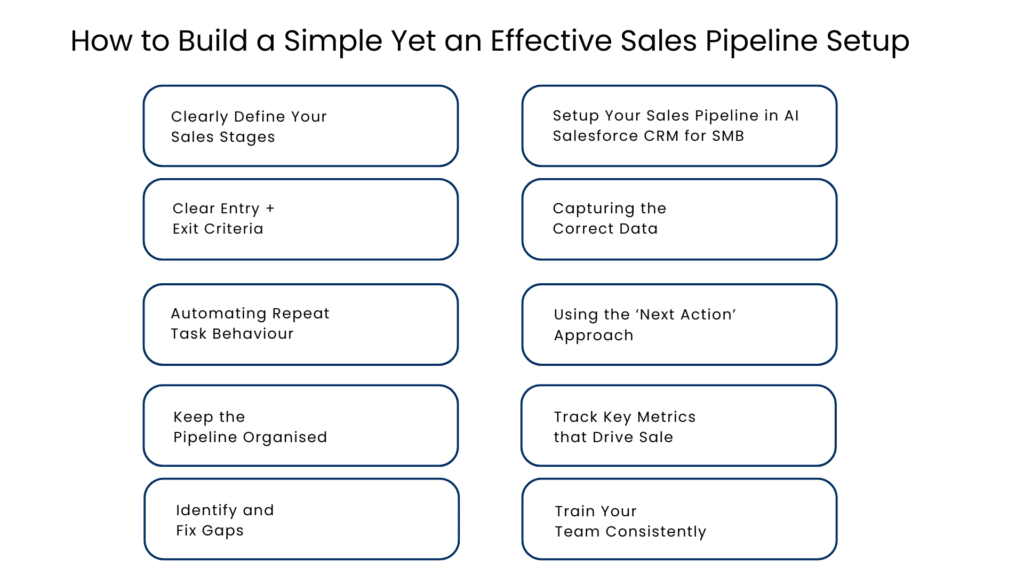
Step 1 – Clearly Define Your Sales Stages
The first step is to figure and map out the key stages that your users go through before making a purchase. The stages should be kept simple and not be overcomplicated. A typical Salesforce CRM for SMB pipeline may look like this:
- Lead Qualified → A lead or an inquiry has come to you
- Need Established → Their needs have been established
- Proposal Sent → A proposal has been sent out
- Negotiation → You are in the negotiation process
- Won / Lost → This means that the deal is closed
Step 2 – Setup Your Sales Pipeline in AI Salesforce CRM for SMB
Inside the CRM solutions for startups using Salesforce and AI, the sales pipelines are managed through opportunities. Here is a clear definition of how to set this up.
- Navigate to Setup > Object Manager > Opportunity > Fields & Relationships
- Configure the Stage field according to the stages you have defined
- Set up a probability value for each stage (for instance, Proposal = 60%)
After completing the above steps, your pipeline will become an interactive board on which deals flow through various stages.
Step 3 – Clear Entry + Exit Criteria
A common mistake made by the SMBs includes impulsiveness. They move with deals quite fast to get closures and in this process often forget to analyse the deals. To avoid this confusion maintaining and defining a clear entry and exit criteria becomes necessary.
While entry criteria defines what happens before a deal enters a specific stage, the exit criteria defines what qualifies it to move forward.
For Example: Let us say you have a Qualified Lead
- Entry: Lead demonstrates interest
- Exit: Budget and decision-maker identified
It means your sales pipeline mirrors reality not your hopes.
Step 4 – Capturing the Correct Data
For SMBs using a top notch AI CRM like Salesforce may be a big moment, but understanding the worth is more critical. It may be tempting to capture every detail but the focus must lie on the essentials. These include:
- Name of contact person and company
- Value of deal
- Anticipated closure date
- Sales stage
- Source of lead
- Next step
Salesforce CRM allows you to modify fields according to your requirements. Keep it simple enough for your team to use.
Step 5 – Automating Repeat Task Behaviour
Using a Salesforce CRM for SMB comes with its own set of advantages, and one such game changing automation is the AI and automation. Automating repeat tasks and behaviours like responding to common queries and follow-ups can help your SMB grow and scale much faster.
Setting up automations will minimize manual effort and ensure that nothing is overlooked.
Simple automations that an SMB must set up include:
- Reminders on follow-ups when the deal is not yet updated
- Alerts in email when the deal is transitioned to different stages
- Creation of tasks upon sending proposals
- Criteria for assigning leads
Step 6 – Using the ‘Next Action’ Approach
Instead of only focusing on the current step, having a clear idea about the next is important. This eliminates the vague responses, statuses, and actions.You may define actions like:
- Schedule demo call
- Pricing approval pending
- Email follow-up on a particular day (based on user insight)
These can be tracked using tasks/notes associated with each opportunity in the Salesforce CRM system. Lack of next steps suggests that the deal has stalled.
Step 7 – Keep the Pipeline Organised
A sales pipeline within the CRM for lead management systems for SMB must be clean and organised at all times. Get your team to view this AI-powered CRM as the single source of truth, not a last resort. This shall be ensured by taking the following actions:
- Eliminate inactive deals
- Close lost deals rapidly
- Maintain up-to-date status on deals
- Analyze pipeline weekly
Step 8 – Track Key Metrics that Drive Sale
Building an active pipeline and leaving it in the CRM is not enough. Tracking your SMB deals and conversations is equally essential. Some important metrics to be tracked as a small business include:
- Conversion rate per stage
- Average deal size
- Sales cycle length
- Win rate
- Value of pipeline vs target
The Salesforce AI and real-time CRM dashboard can aid you in analyzing these metrics and identifying any trends.
Step 9 – Identify and Fix Gaps
Once you have all the automations and structures in place, your scalable CRM solution for SMB must be able to tell you where you lack or where the deals fall apart. For instance:
- Too much business getting stuck in “Proposal Sent”? → Pricing needs clarification
- “Qualified” to “Proposal” is not converting much? → Improvements in qualifications needed
- Negotiation processes too lengthy? → Simplify proposals
You as a small and mid-sized business must apply these learnings to fine-tune your sales process constantly.
Step 10 – Train Your Team Consistently
Once the entire Salesforce CRM structure with AI functionalities are enabled, the key lies in training. You must ensure that your team is aware of all the functionalities – new or old, and are able to operate the CRM smoothly. You must ensure that:
- Everyone will understand every step
- Data entry will be fast and easy
- The process follows an accurate workflow
- It eliminates complexity
Conclusion
Not only does a properly designed pipeline with an AI-led Salesforce CRM for SMB organize the leads, but it changes the overall attitude towards sales in your organization.
By implementing a basic set-up in the Salesforce CRM solution, an SMB will be able to see a much clearer picture regarding sales-related activities, follow the process consistently, and accurately predict future income. As this approach gains traction, higher conversion rates become a natural outcome of the entire process. What counts is consistency not complicated procedures.
FAQs
What is SMB CRM software?
SMB CRM software can help you store all information about customers in one place, providing a holistic picture of each relationship. Manage sales pipelines and perform follow-ups that will save you time. Interact with clients using timely insights. Work more efficiently with assistance from AI-based solutions.
Does Salesforce CRM fit a small business?
Implement your ideas with Salesforce. With Salesforce CRM, you will receive all-in-one solutions that will enable you to bring in more customers, retain their loyalty, and make your business easier to run. All thanks to AI-powered autonomous agents.
How would you establish a pipeline within the Salesforce CRM system?
To establish the pipeline, you will: Go to Setup → Object Manager → Opportunity → Fields & Relationships, Configure the Stage field and Set probabilities for each stage.
What is meant by entry and exit criteria in the sales pipeline context?
While entry criteria defines what happens before a deal enters a specific stage, the exit criteria defines what qualifies it to move forward.
How does a well-designed pipeline help in selling?
Well, the well-designed pipeline results in clarity, uniformity, and good forecasting. Eventually, efficiency increases, customer relations improve, and conversions go up.
For more insights, updates, and expert tips, follow us on LinkedIn.