

• About Us
    • Who we are
    • Our Clients
  • Services
    • Salesforce Quick Start Packages
    • Salesforce Consulting
    • Salesforce Implementation
    • Salesforce Managed Services
    • Salesforce Integration
    • Salesforce Staff Augmentation
  • Products
    • Communicat-O
    • Real Estate CRM Solution
    • mDocIT
    • IdentryX
      • Aadhaar Solution
      • PAN Solution
      • GST Solution
    • Salesforce Clouds
      • Sales Cloud
      • Marketing Cloud
      • Pardot
      • Service Cloud
      • Commerce Cloud
      • Revenue Lifecycle Management
      • Einstein Analytics
      • Financial Services Cloud
      • Non-Profit Cloud
      • Community Cloud
      • Health Cloud
  • Industry Solutions
    • Real Estate
    • High Tech
    • Financial Services
    • Manufacturing
    • Healthcare
    • Insurance
    • Non-Profit
    • Travel | Hospitality
  • Resources
    • Blogs
    • Case Studies
    • Whitepapers and eBooks
  • Careers
Contact Us
  • About Us
    • Who we are
    • Our Clients
  • Services
    • Salesforce Quick Start Packages
    • Salesforce Consulting
    • Salesforce Implementation
    • Salesforce Managed Services
    • Salesforce Integration
    • Salesforce Staff Augmentation
  • Products
    • Communicat-O
    • Real Estate CRM Solution
    • mDocIT
    • IdentryX
      • Aadhaar Solution
      • PAN Solution
      • GST Solution
    • Salesforce Clouds
      • Sales Cloud
      • Marketing Cloud
      • Pardot
      • Service Cloud
      • Commerce Cloud
      • Revenue Lifecycle Management
      • Einstein Analytics
      • Financial Services Cloud
      • Non-Profit Cloud
      • Community Cloud
      • Health Cloud
  • Industry Solutions
    • Real Estate
    • High Tech
    • Financial Services
    • Manufacturing
    • Healthcare
    • Insurance
    • Non-Profit
    • Travel | Hospitality
  • Resources
    • Blogs
    • Case Studies
    • Whitepapers and eBooks
  • Careers
Contact Us
  • About Us
    • Who we are
    • Our Clients
  • Services
    • Salesforce Quick Start Packages
    • Salesforce Consulting
    • Salesforce Implementation
    • Salesforce Managed Services
    • Salesforce Integration
    • Salesforce Staff Augmentation
  • Products
    • Communicat-O
    • Real Estate CRM Solution
    • mDocIT
    • IdentryX
      • Aadhaar Solution
      • PAN Solution
      • GST Solution
    • Salesforce Clouds
      • Sales Cloud
      • Marketing Cloud
      • Pardot
      • Service Cloud
      • Commerce Cloud
      • Revenue Lifecycle Management
      • Einstein Analytics
      • Financial Services Cloud
      • Non-Profit Cloud
      • Community Cloud
      • Health Cloud
  • Industry Solutions
    • Real Estate
    • High Tech
    • Financial Services
    • Manufacturing
    • Healthcare
    • Insurance
    • Non-Profit
    • Travel | Hospitality
  • Resources
    • Blogs
    • Case Studies
    • Whitepapers and eBooks
  • Careers
manras-logo-mobile
  • About Us
    • Who we are
    • Our Clients
  • Services
    • Salesforce Quick Start Packages
    • Salesforce Consulting
    • Salesforce Implementation
    • Salesforce Managed Services
    • Salesforce Integration
    • Salesforce Staff Augmentation
  • Products
    • Communicat-O
    • Real Estate CRM Solution
    • mDocIT
    • IdentryX
      • Aadhaar Solution
      • PAN Solution
      • GST Solution
    • Salesforce Clouds
      • Sales Cloud
      • Marketing Cloud
      • Pardot
      • Service Cloud
      • Commerce Cloud
      • Revenue Lifecycle Management
      • Einstein Analytics
      • Financial Services Cloud
      • Non-Profit Cloud
      • Community Cloud
      • Health Cloud
  • Industry Solutions
    • Real Estate
    • High Tech
    • Financial Services
    • Manufacturing
    • Healthcare
    • Insurance
    • Non-Profit
    • Travel | Hospitality
  • Resources
    • Blogs
    • Case Studies
    • Whitepapers and eBooks
  • Careers
What is Salesforce External ID and Its Role in Data Import?

What is Salesforce External ID and Its Role in Data Import?

In today’s businesses, various systems are used to manage the customer base, sale processes, and other operations. The Salesforce system may be considered the main CRM system, while there could be ERP systems, marketing software, and other types of software used by a company.

In case of data import into the Salesforce platform from an external source, it is necessary to make sure that records are accurate and not duplicated. The Salesforce External ID helps in this process.

Even when working with data coming from other systems while importing them in Salesforce, the smallest discrepancy might cause duplication and corrupt relations. Here is when the concept of External ID becomes vital for enterprises. With the help of External ID, you may easily integrate your data without having any duplicates.


What is an External ID?

A Salesforce External ID is an advanced feature in Salesforce that enables a user to create a custom field for holding an externally defined identifier within a Salesforce object. External IDs differ significantly from standard record IDs created by the system because External IDs refer to values that already exist in your organization.

When an External ID field is configured, it provides Salesforce with the ability to identify a matching record when importing data. Consequently, it eliminates the problem of duplication.

Consider, for example, the following:

  • Customer ID from an ERP system
  • Employee code from HR software
  • Subscriber ID from a marketing platform

This means that those identifying numbers are already integrated into your workflow processes. Using Salesforce external IDs allows you to build a connection.

The reasons why this is important are:

If you don’t have external IDs, Salesforce won’t be able to distinguish whether the data sent corresponds to existing or a new record. This will result in either duplicated entries or inaccuracies.

External IDs allow Salesforce to:

  • Identify corresponding records based on entered information
  • Make accurate updates to the record
  • Avoid duplications

How External IDs Enhance Data Import?

One of the main advantages of using External IDs is preventing duplicate records. Without an External ID, Salesforce relies on its internal record IDs or standard fields to determine whether a record already exists. This method can be unreliable, particularly when importing large volumes of data or when external system identifiers differ from Salesforce IDs.

External IDs allow Salesforce to identify existing records quickly and update them as needed, rather than creating new duplicates. This makes imports cleaner, more reliable, and easier to manage, especially for organizations handling extensive data sets.

Another key feature is the upsert operation, which combines “update” and “insert” in a single action. When performing an upsert, Salesforce health check for a matching External ID: if a match is found, the existing record is updated; if not, a new record is created. For example, when importing updated customer details from a billing system, Salesforce can handle both existing and new records automatically, reducing manual reconciliation and improving efficiency.

Integrations and System Synchronization

External IDs will also make it easier to integrate Salesforce with other applications. For example, when two different applications share a common identifier, an API or the Data Loader can find and update the right records within Salesforce without errors. This will enable the sales and customer service teams to get the right information at all times.

External ID Configuration Steps

External IDs are configured by creating a unique custom field on the desired Salesforce object and setting it as the external ID field. External IDs could either be of text, number, or email type, and could be used on standard Salesforce objects such as Account, Contact, and Lead, among others.

It is imperative that all External ID values be unique, since any duplication will jeopardize the data’s accuracy and impede the import process.


Salesforce External ID Importance for Organizations
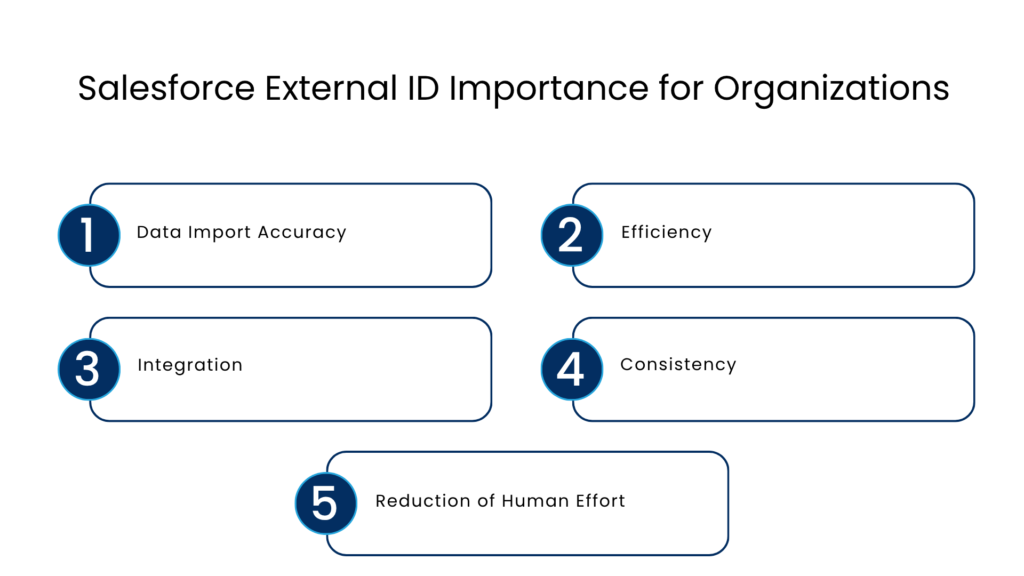
Salesforce External ID Importance for Organizations - Manras Technologies

The section below aims to help the developers understand what is the importance of Data apex synchronization in Salesforce.

  • Data Import Accuracy: Helps in matching data and avoids duplication.
  • Efficiency: UPSERTS make both insertions and updates possible at once, hence increasing efficiency.
  • Integration: Enables easy integration with other systems including ERP and marketing systems.
  • Consistency: Helps with data consistency reporting.
  • Reduction of Human Effort: Makes it unnecessary to manually clean and reconcile data.

Looking at the Bigger Picture and Importance of Salesforce Data Integration

External IDs are not just about technology; they are part of a business strategy for handling data.

In the modern data-driven world, businesses:

  • Operate on multiple platforms
  • Are sitting on a growing pile of data
  • Require information instantly

Without proper alignment of data, companies would:

  • Make poor decisions
  • Be ineffective in operations
  • Lose credibility among customers

This is where External IDs can make a difference as they:

  • Help maintain consistent data
  • Make integration easier
  • Simplify scaling your data operations

Best Practices for Implementing External IDs

When implementing External IDs, follow these best practices:

  • Uniqueness: Make sure each entry is unique
  • Consistency: Stick to one data format
  • Stability: Do not change IDs frequently
  • Data Validation Before Import: Make sure your data is clean
  • Use Upsert: When Loading Large Datasets make sure to use Upsert

Conclusion

External IDs prove to be quite useful in helping import data accurately and reliably into Salesforce. This is possible due to such capabilities as avoiding duplicate records, upsert operations, and easy integration with other external applications. For companies dealing with vast amounts of data, using External IDs will lead to reduced manual work, greater efficiency, and increased reliability of Salesforce being a single source of truth.

When used properly, External IDs contribute greatly to keeping things organized and running smoothly. Although it takes some preparation and thought to set up External IDs properly in order to avoid duplicates, doing so is well worth it when you consider the long-term efficiency that you get from it.

Therefore, for any company operating under complex data conditions, there is no choice but to use External IDs. In such a way, they ensure low costs on labor, high-quality data, and being the single source of truth for your Salesforce. External IDs help to make your business run efficiently and effectively.

FAQs

What is a Salesforce External ID?

A Salesforce External ID is an advanced feature in Salesforce that enables a user to create a custom field for holding an externally defined identifier within a Salesforce object. External IDs differ significantly from standard record IDs created by the system because External IDs refer to values that already exist in your organization.

What is the difference between the External ID and Salesforce record ID?

Unlike the Salesforce record ID, which is a system-generated unique ID created within Salesforce and can be unique only within Salesforce, the External ID is created outside Salesforce.

Why must External IDs be unique?

Each External ID must be unique to ensure accurate record matching. Duplicate External IDs can cause incorrect updates, data inconsistencies, and failed imports.

What is the maximum number of External IDs in Salesforce?

External ID fields are limited to 25 per object. An External ID field must be Custom text, number, or email field. External ID fields store record IDs from other systems than Salesforce.

Why do we need an external ID in Salesforce?

The field called “External ID” can be referred to for an external system ID. This ID can act as a link to any external system inside the Salesforce application. These IDs are searchable within the Salesforce database, and one can even use an Insert API call using the External ID while making changes through the Data Loader.

For more insights, updates, and expert tips, follow us on LinkedIn.

6 Signs That Your Business Needs AI focused Salesforce Support Partners6 Signs That Your Business Needs AI focused Salesforce Support PartnersApril 17, 2026
Recent Posts
  • What is Salesforce External ID and Its Role in Data Import?
    What is Salesforce External ID and Its Role in Data Import?
  • 6 Signs That Your Business Needs AI focused Salesforce Support Partners
    6 Signs That Your Business Needs AI focused Salesforce Support Partners
  • Salesforce Flow vs. Apex: When to Use Which And Why It Matters?
    Salesforce Flow vs. Apex: When to Use Which And Why It Matters?
  • Top Salesforce Consulting Partners in India – 2026 Guide
    Top Salesforce Consulting Partners in India – 2026 Guide
Talk to an Expert now!!

    Logo

    United Kingdom: London

    United States: Wyoming

    India: Chandigarh, Gurugram, Mumbai & Surat

    Email:

    team@manras.com

    Insights

    Blogs

    Case Studies

    Company

    About Us

    Our Clients

    Career

    Contact Us

    Services

    Salesforce Quick Start Packages

    Salesforce Consulting

    Salesforce Implementation

    Salesforce Managed Services

    Salesforce Integration

    Salesforce Staff Augmentation

    Copyright © 2026 Manras. All Rights Reserved

    Privacy Statement | Site Map

    #integrio_button_69ef03e85ad4c .wgl_button_link { color: rgba(255,255,255,1); }#integrio_button_69ef03e85ad4c .wgl_button_link:hover { color: rgba(50,50,50,1); }#integrio_button_69ef03e85ad4c .wgl_button_link { border-color: rgba(21,159,218,1); background-color: rgba(21,159,218,1); }#integrio_button_69ef03e85ad4c .wgl_button_link:hover { border-color: rgba(21,159,218,1); background-color: rgba(255,255,255,0); }#integrio_button_69ef03e85ad4c.effect_3d .link_wrapper { color: rgba(21,159,218,1); }#integrio_button_69ef03e85e386 .wgl_button_link { color: rgba(255,255,255,1); }#integrio_button_69ef03e85e386 .wgl_button_link:hover { color: rgba(50,50,50,1); }#integrio_button_69ef03e85e386 .wgl_button_link { border-color: rgba(21,159,218,1); background-color: rgba(21,159,218,1); }#integrio_button_69ef03e85e386 .wgl_button_link:hover { border-color: rgba(21,159,218,1); background-color: rgba(12,90,219,0); }#integrio_button_69ef03e85e386.effect_3d .link_wrapper { color: rgba(21,159,218,1); }#integrio_soc_icon_wrap_69ef03e86d342 a{ background: #314f96; border-color: transparent; }#integrio_soc_icon_wrap_69ef03e86d342 a:hover{ background: #ffffff; border-color: #314f96; }#integrio_soc_icon_wrap_69ef03e86d342 a{ color: #ffffff; }#integrio_soc_icon_wrap_69ef03e86d342 a:hover{ color: #314f96; }.integrio_module_social #soc_icon_69ef03e86d3851{ color: #ffffff; }.integrio_module_social #soc_icon_69ef03e86d3851:hover{ color: #4661c5; }.integrio_module_social #soc_icon_69ef03e86d3851{ background: #474747; }.integrio_module_social #soc_icon_69ef03e86d3851:hover{ background: #474747; }.integrio_module_social #soc_icon_69ef03e86d3a32{ color: #ffffff; }.integrio_module_social #soc_icon_69ef03e86d3a32:hover{ color: #0a66c2; }.integrio_module_social #soc_icon_69ef03e86d3a32{ background: #474747; }.integrio_module_social #soc_icon_69ef03e86d3a32:hover{ background: #474747; }.integrio_module_social #soc_icon_69ef03e86d3af3{ color: #ffffff; }.integrio_module_social #soc_icon_69ef03e86d3af3:hover{ color: #ed407c; }.integrio_module_social #soc_icon_69ef03e86d3af3{ background: #474747; }.integrio_module_social #soc_icon_69ef03e86d3af3:hover{ background: #474747; }.integrio_module_social #soc_icon_69ef03e86d3ba4{ color: #ffffff; }.integrio_module_social #soc_icon_69ef03e86d3ba4:hover{ color: #314f96; }.integrio_module_social #soc_icon_69ef03e86d3ba4{ background: #474747; }.integrio_module_social #soc_icon_69ef03e86d3ba4:hover{ background: #474747; }.integrio_module_social #soc_icon_69ef03e86d3c45{ color: #ffffff; }.integrio_module_social #soc_icon_69ef03e86d3c45:hover{ color: #ff0000; }.integrio_module_social #soc_icon_69ef03e86d3c45{ background: #474747; }.integrio_module_social #soc_icon_69ef03e86d3c45:hover{ background: #474747; }
    Let's Connect & Transform Your Business!

      WhatsApp